
A deep dive into alpha blending with compute casters
Written by Jesper Tingvall, Product Expert, Simplygon
Disclaimer: The code in this post is written using version 10.4.366.0 of Simplygon. If you encounter this post at a later stage, some of the API calls might have changed. However, the core concepts should still remain valid.
Introduction
In this blog we will have a look at how to create proxy models for assets containing transparent materials. The solution is to use alpha blending in the compute shaders used with compute casters. We will look at two different ways to blend channels.
This blog is a continuation of Using your own shaders for material baking with Compute Casting and Handling alpha clipping with compute casters. We will use the same code skeleton and only the new parts will be introduced, so reading the previous blogs for a full understanding is recommended.
Prerequisites
This example will use the Simplygon Python API, but the same concepts can be applied to all other integrations of the Simplygon API. Our shaders are specified in HLSL but it is also possible to use GLSL.
Problem to solve
We have several models for which we want to create remeshed proxies. The models contain transparent materials and we would like the output proxy model to contain both the transparent materials and the geometry behind it.
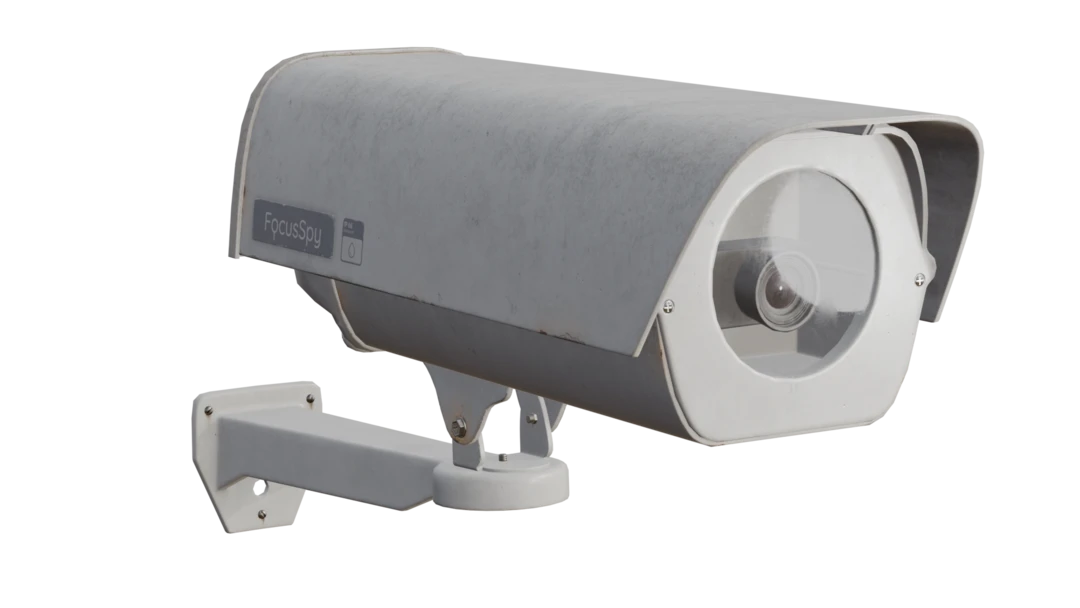
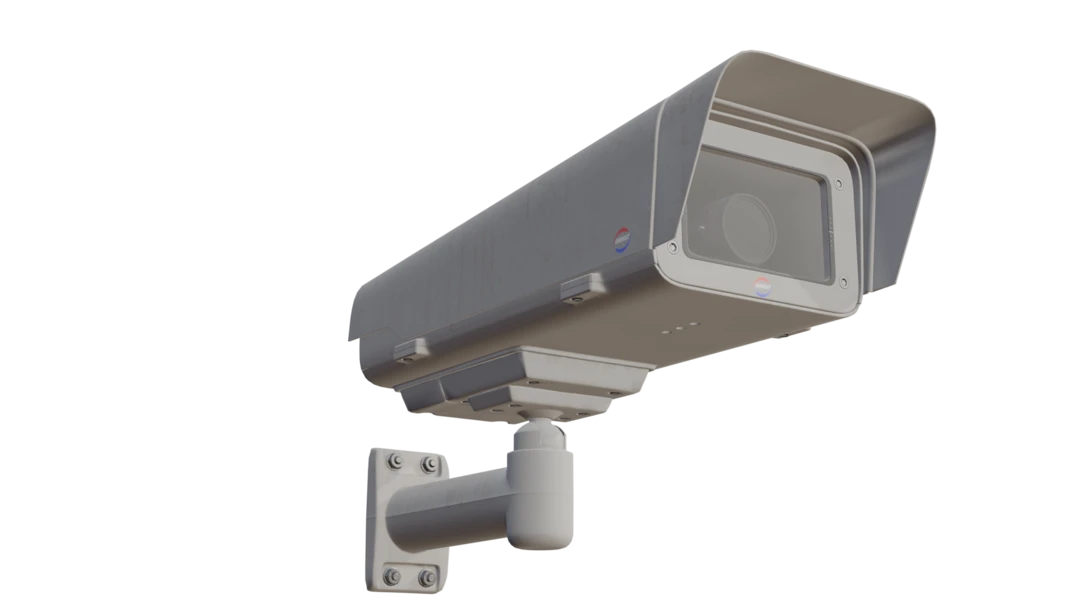

The assets we will use are the following. The assets have been modified to suit the topic of the blog better.
The materials contain 5 channels:
- Diffuse
- Roughness
- Metallic
- Opacity
- Normals
The assets are saved with normals, tangents and bitangents vertex attributes. This data is needed to cast the tangent-space normal map. If your input assets do not contain this data, the normal map output will be empty when casting normal maps.
Solution
We will use alpha blending in our shaders to achieve the desired result. The idea is to cast multiple layers of textures for each material channel and blend them together based on opacity.
We are going to use the same solution structure as Handling alpha clipping with compute casters with an xml describing the material casting per asset. We will switch to a remeshing pipeline and introduce alpha blending in our shaders.
Remeshing pipeline
We will start with creating a remeshing pipeline. It is possible to use another type of impostor creation pipeline like billboard cloud, but for these assets remeshing is more suitable.
What is important is that we set MaximumLayers in our mapping image to at least the number of layers we want to bake. If we set this to a low number we might end up with parts missing in our output textures.
def create_remeshing_pipeline(sg: Simplygon.ISimplygon, screen_size : int, texture_size : int, hole_filling) -> Simplygon.spRemeshingPipeline:
    """Create remeshing pipeline with specified quality settings."""

    pipeline = sg.CreateRemeshingPipeline()
    settings = pipeline.GetRemeshingSettings()
    settings.SetOnScreenSize(screen_size)
    settings.SetHoleFilling(hole_filling)

    mapping_image_settings = pipeline.GetMappingImageSettings()
    mapping_image_settings.SetGenerateMappingImage(True)
    mapping_image_settings.SetGenerateTangents(True)
    mapping_image_settings.SetGenerateTexCoords(True)
    mapping_image_settings.SetMaximumLayers(6) # Number of layers that can be overlapping

    material_output_settings = mapping_image_settings.GetOutputMaterialSettings(0)
    material_output_settings.SetTextureHeight(texture_size)
    material_output_settings.SetTextureWidth(texture_size)
    material_output_settings.SetMultisamplingLevel(2)
    material_output_settings.SetGutterSpace(4)

    mapping_image_settings.SetTexCoordName("MaterialLOD")

    return pipeline
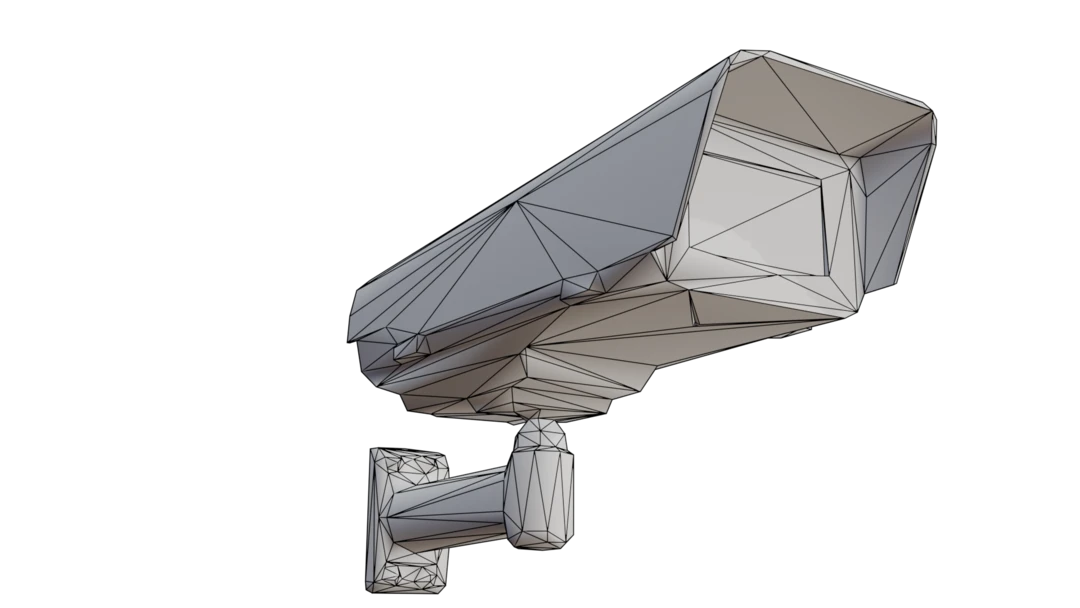
After processing the asset with our remeshing pipeline we get a low poly proxy model. Notice that the camera geometry behind the glass is removed.
Alpha blending for diffuse channel
Alpha blending of the diffuse channel is quite straight forward. We sample both the diffuse texture and the opacity texture. If the opacity is zero we discard the value, otherwise we blend it with the previous layers value based on the opacity.
We also introduce a check that discards the value if the surface normal is facing away from the destination normal. This is to simulate a one-sided material. If our materials are rendered without backface culling this check can be removed.
float4 CalculateDiffuseChannel()
{
    // If the surface normal is facing away from the destination normal, we discard the value. We consider this to be a one sided material.
    if (dot(normalize(Normal), normalize(sg_DestinationNormal)) <= 0.0f){
        sg_DiscardValue = true;
        return sg_PreviousValue;
    }

    float4 color = DiffuseTexture.SampleLevel(DiffuseTextureSamplerState, TexCoord,0);
    float4 opacity = OpacityTexture.SampleLevel(OpacityTextureSamplerState, TexCoord,0);

    if (opacity.r <= 0.0f) {
        sg_DiscardValue = true;
        return sg_PreviousValue;
	}

    float srcAlpha = saturate(opacity.r);
    if (sg_HasPreviousValue) {
        return color * srcAlpha + sg_PreviousValue * (1.0f - srcAlpha);
    }

    return color;
}
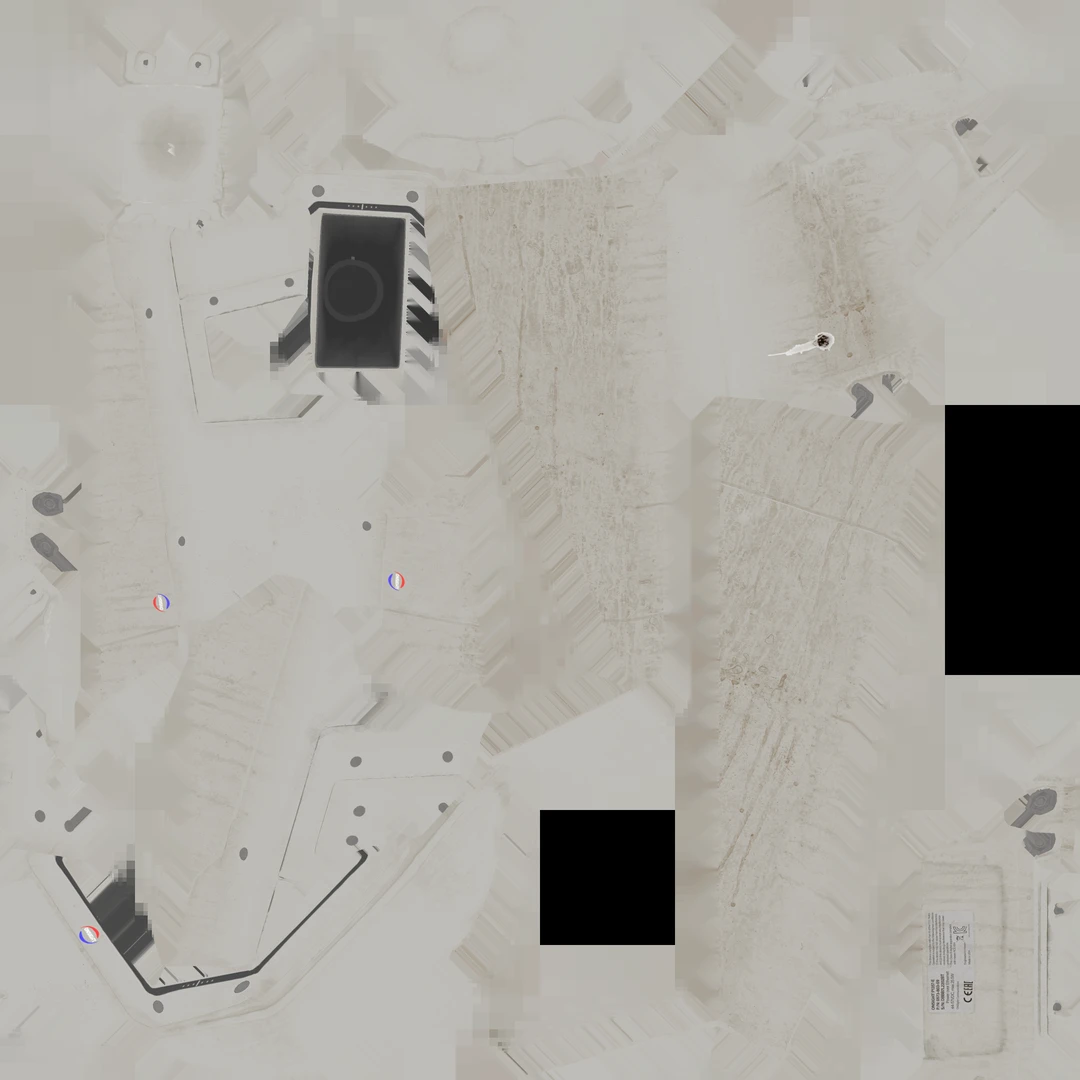
If we look at the output texture we can see that we have a camera hiding behind the glass.
Camera 2: Glass material-inspired approach for metal, roughness and normals
So blending diffuse channel was pretty straightforward. How about the other channels like metallic, roughness, opacity and normals? The tricky thing is that there is not really a right way to blend these channels together. We will showcase two different ideas on how to handle these channels. First one is that we take the values from the topmost layer. The reasoning is that we have a very specular glass material on the top, and we want to preserve its shine at angles. Same for any smudges or dirt on the glass.
The code for this is simpler than for diffuse. Here we just discard the value if the opacity is zero or the surface normal is facing away from the destination normal, otherwise we return the sampled value. This snippet shows the roughness channel, but the same logic can be applied to metallic and normals.
float4 CalculateRoughnessChannel()
{
    // If the surface normal is facing away from the destination normal, we discard the value. We consider this to be a one sided material.
    if (dot(normalize(Normal), normalize(sg_DestinationNormal)) <= 0.0f){
        sg_DiscardValue = true;
        return sg_PreviousValue;
    }

    float4 opacity = OpacityTexture.SampleLevel(OpacityTextureSamplerState, TexCoord,0);
    if (opacity.r <= 0.0f) {
        sg_DiscardValue = true;
        return sg_PreviousValue;
	}

    float4 roughness = RoughnessTexture.SampleLevel(RoughnessTextureSamplerState, TexCoord,0);
    return roughness;
}
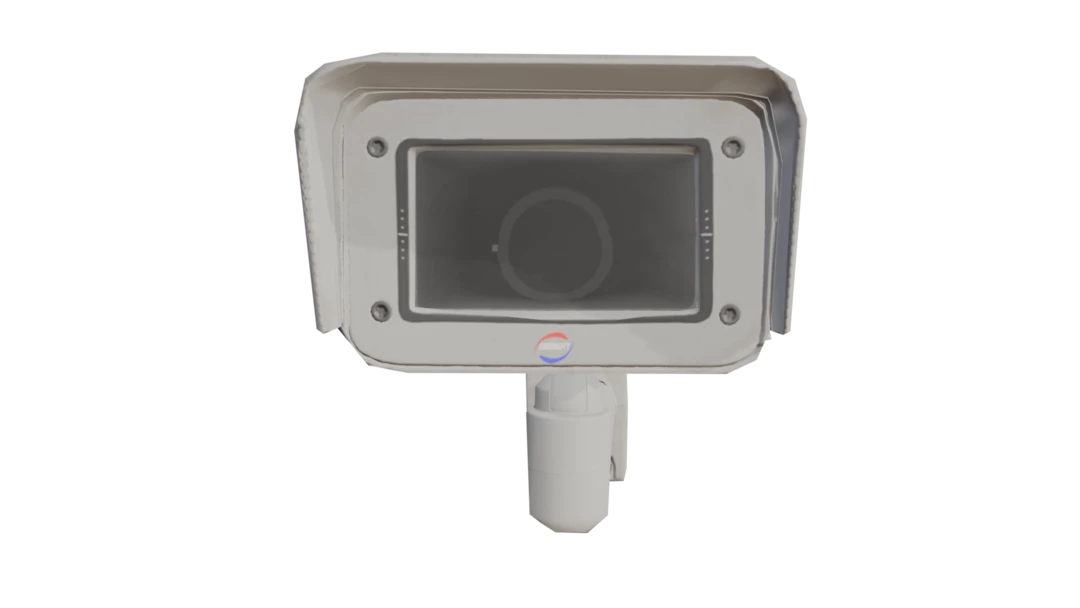
Here is the resulting model. We can see that the shine of the glass material is preserved well when we look at it from an angle. When looking at it straight on it looks a bit more flat since we are only taking the topmost layer's normal data.
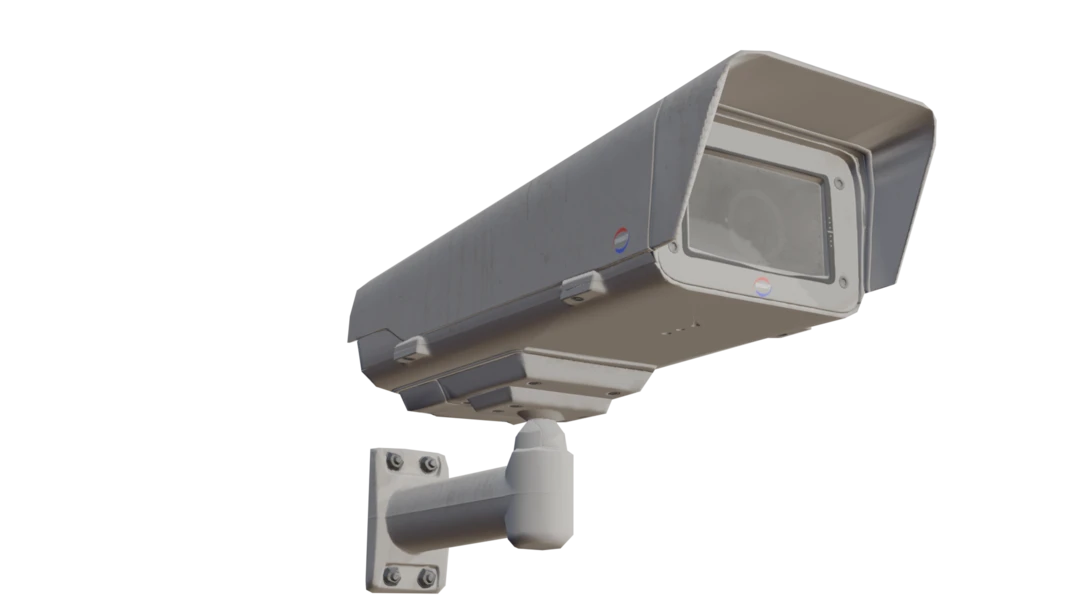
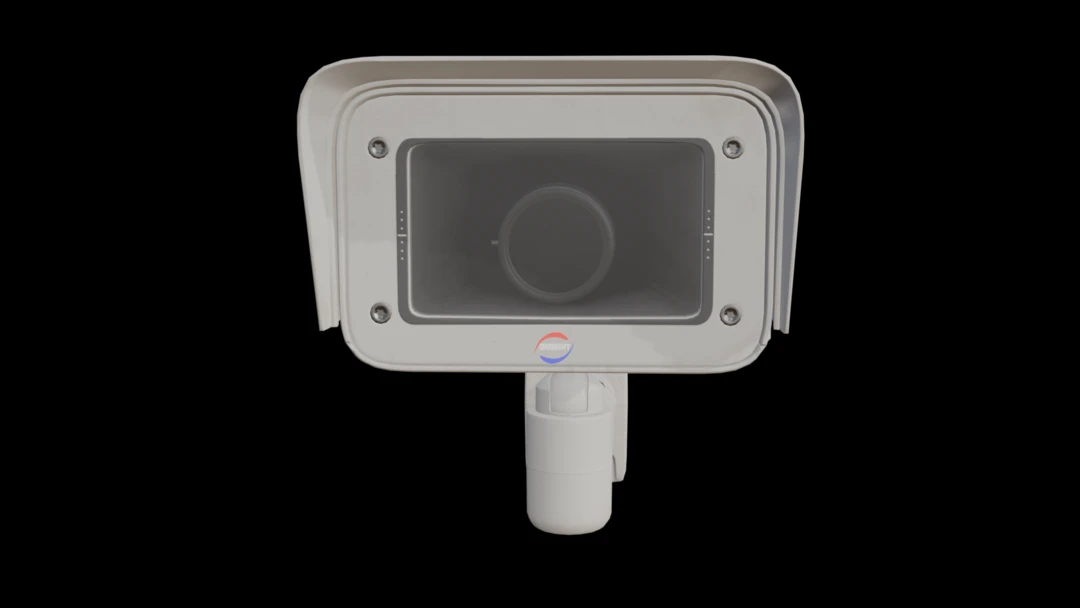
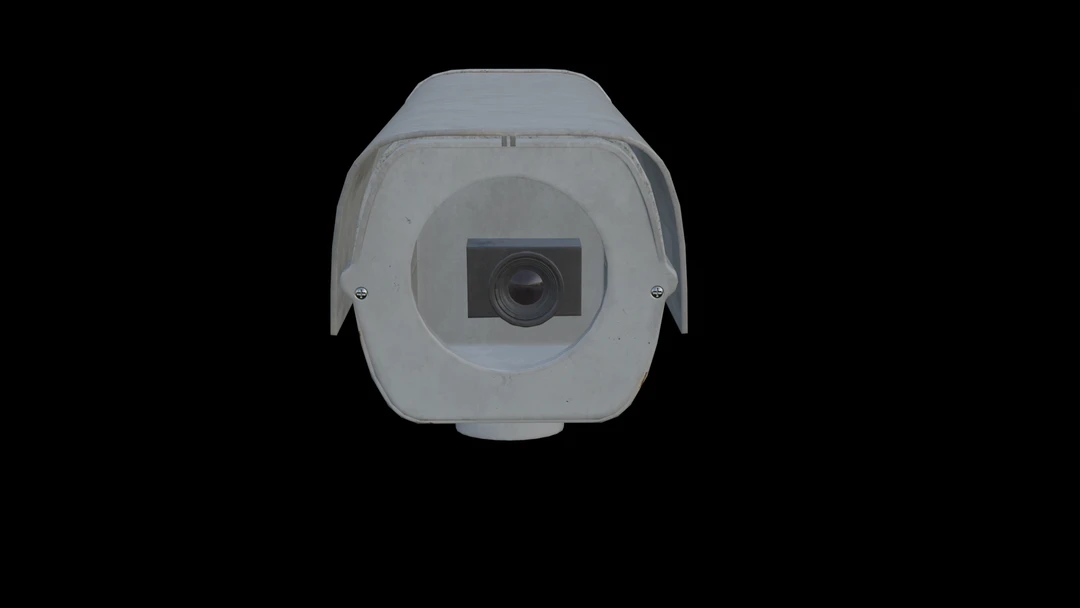
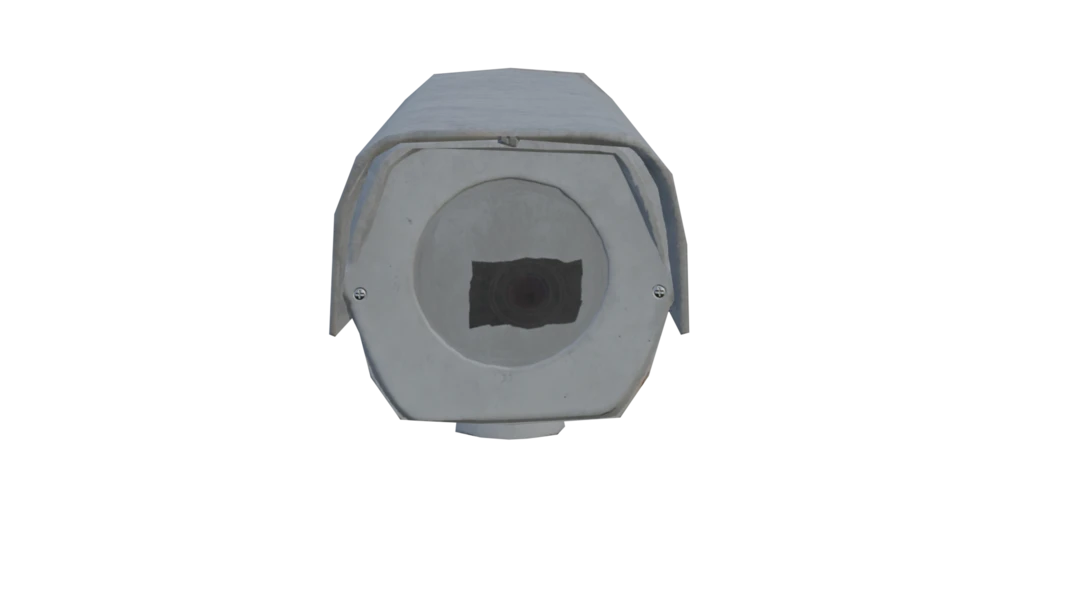
If we try this approach on camera 1 we can see some of the limitations. The camera lens is not preserved that well since the glass material on top of it overrides the normal map.
Camera 1: Alpha blending for other channels
Let us now try a different approach. Instead of taking the topmost layer's value we will alpha blend the other channels as well. This way we hope to preserve some of the details from the layers behind the glass. Here we do the blending the same way for diffuse, roughness and metallic channels.
float4 CalculateRoughnessChannel()
{
    // If the surface normal is facing away from the destination normal, we discard the value. We consider this to be a one sided material.
    if (dot(normalize(Normal), normalize(sg_DestinationNormal)) <= 0.0f){
        sg_DiscardValue = true;
        return sg_PreviousValue;
    }

    float4 opacity = OpacityTexture.SampleLevel(OpacityTextureSamplerState, TexCoord,0);
    if (opacity.r <= 0.0f) {
        sg_DiscardValue = true;
        return sg_PreviousValue;
	}
    float srcAlpha = saturate(opacity.r);

    float4 roughness = RoughnessTexture.SampleLevel(RoughnessTextureSamplerState, TexCoord,0);

    if (sg_HasPreviousValue) {
        return roughness * srcAlpha + sg_PreviousValue * (1.0f - srcAlpha);
    }

    return roughness;
}
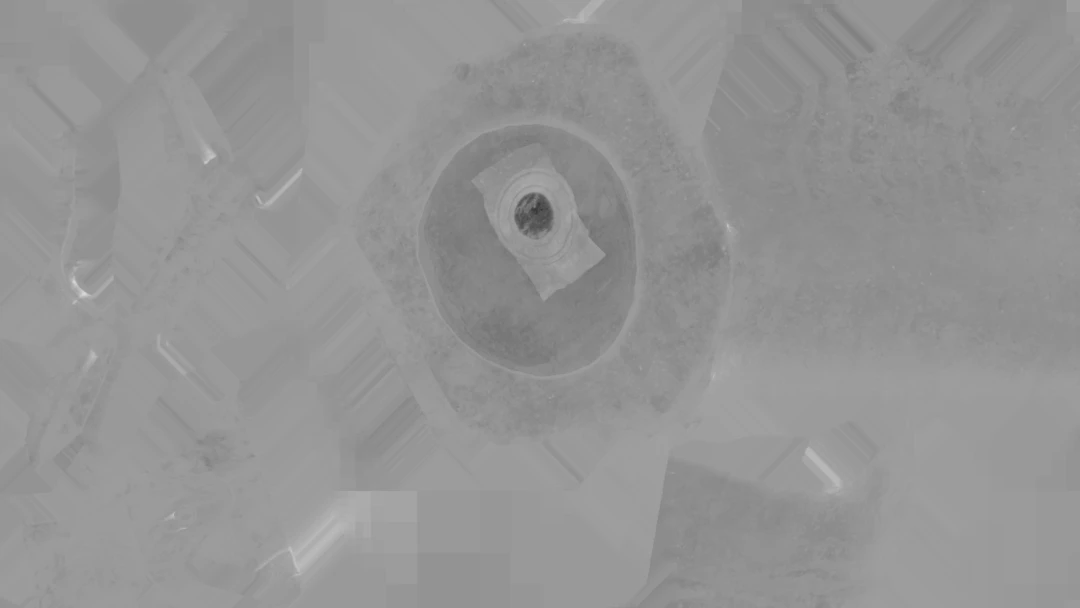
Here is the resulting roughness texture. We can see how the camera lenses are blended with the glass material on top.
For normals we need to do some extra work. When blending the normals we do it in our destination tangent space. So we need to transform both the sampled normal map as well as the previous value. After blending we normalize the resulting normal.
float4 CalculateNormalsChannel()
{
    // If the surface normal is facing away from the destination normal, we discard the value. We consider this to be a one sided material.
    if (dot(normalize(Normal), normalize(sg_DestinationNormal)) <= 0.0f){
        sg_DiscardValue = true;
        return sg_PreviousValue;
    }

    float4 opacity = OpacityTexture.SampleLevel(OpacityTextureSamplerState, TexCoord,0);
    float srcAlpha = saturate(opacity.r);
    if (srcAlpha.r <= 0.0f) {
        if (sg_HasPreviousValue) {
            return sg_PreviousValue;
        } else {
            sg_DiscardValue = true;
            return float4(0.5,0.5,1,0);
        }
	}
    sg_DiscardValue = false;


    float3 tangentSpaceNormal = (NormalTexture.SampleLevel(NormalTextureSamplerState, TexCoord,0).xyz * 2.0) - 1.0;

	// transform into an object-space vector
	float3 objectSpaceNormal = 	tangentSpaceNormal.x * normalize(Tangent) +
								tangentSpaceNormal.y * normalize(Bitangent) +
								tangentSpaceNormal.z * normalize(Normal);

	// transform the object-space vector into the destination tangent space
	tangentSpaceNormal.x = dot( objectSpaceNormal , normalize(sg_DestinationTangent) );
	tangentSpaceNormal.y = dot( objectSpaceNormal , normalize(sg_DestinationBitangent) );
	tangentSpaceNormal.z = dot( objectSpaceNormal , normalize(sg_DestinationNormal) );

	// normalize, the tangent basis is not necessarily orthogonal
	tangentSpaceNormal = normalize(tangentSpaceNormal);

    if (sg_HasPreviousValue) {
        // Let us try to transform our previous value to destination tangent space as well
        float3 previousValueTangentSpace = (sg_PreviousValue * 2.0) - 1.0;

        // Technically wrong but close enough...?
        tangentSpaceNormal = tangentSpaceNormal * srcAlpha + previousValueTangentSpace * (1.0f - srcAlpha);
        tangentSpaceNormal = normalize(tangentSpaceNormal);
    } else {
    }
	return float4( ((tangentSpaceNormal + 1.0)/2.0) , 1.0);
}
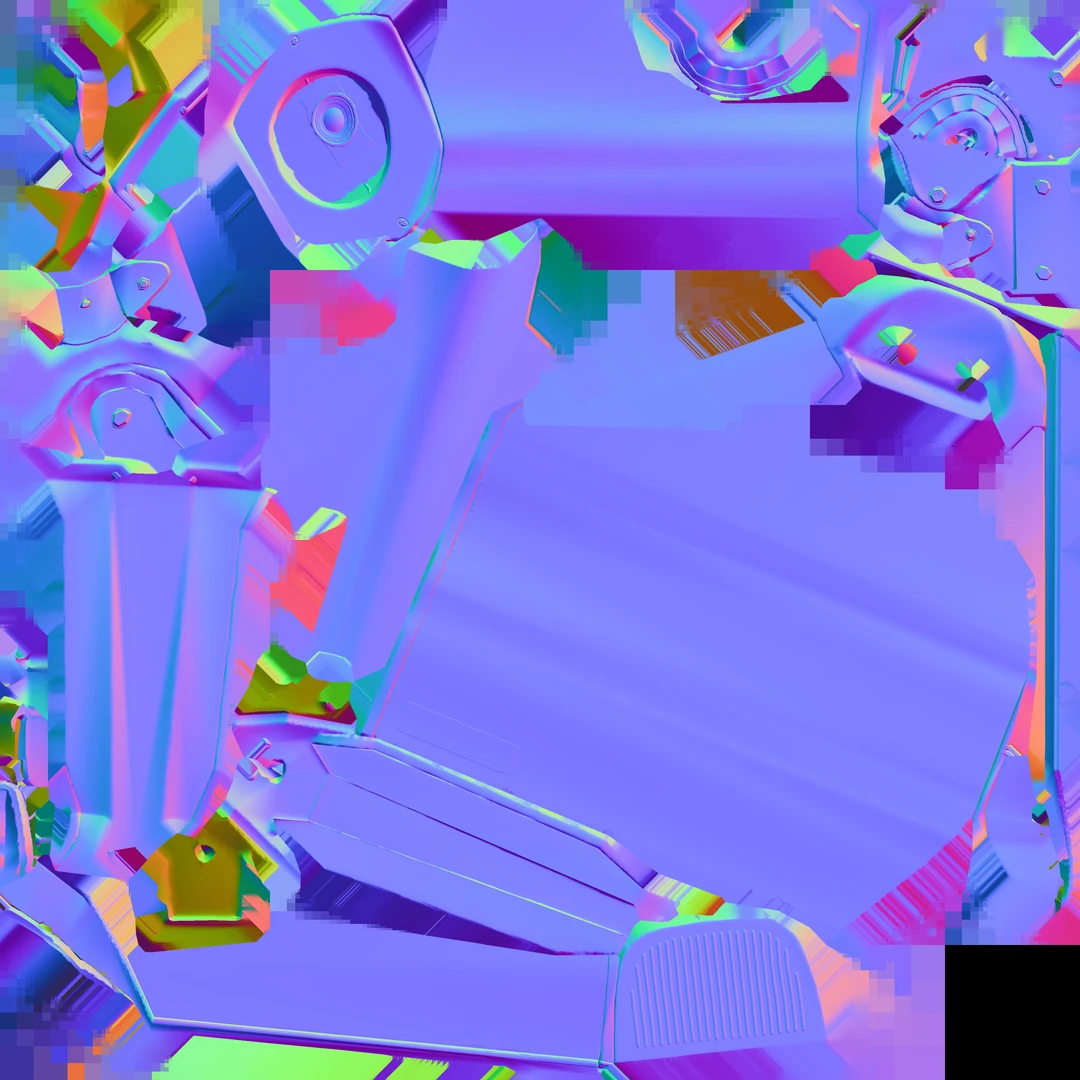
And here is the resulting normal map after blending. We can see that the camera is visible from behind the glass. It is worth to point out that our resulting normal map represents a normal which is not present in the original model, it is a blend of the glass and the camera.
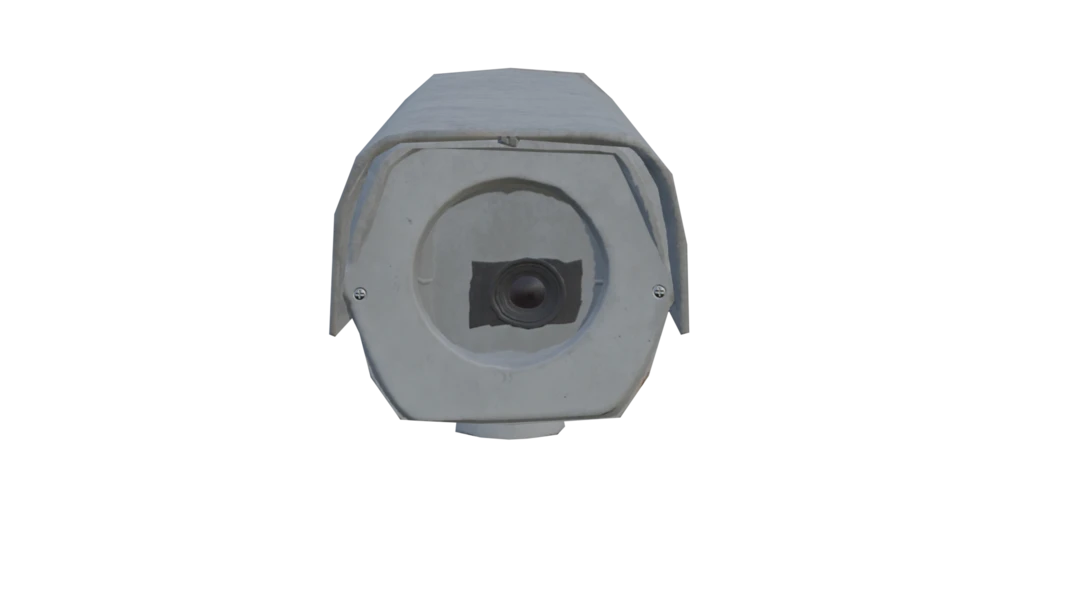
Now let us revisit camera 1 with this new approach. We can see that the lens details are preserved better now.
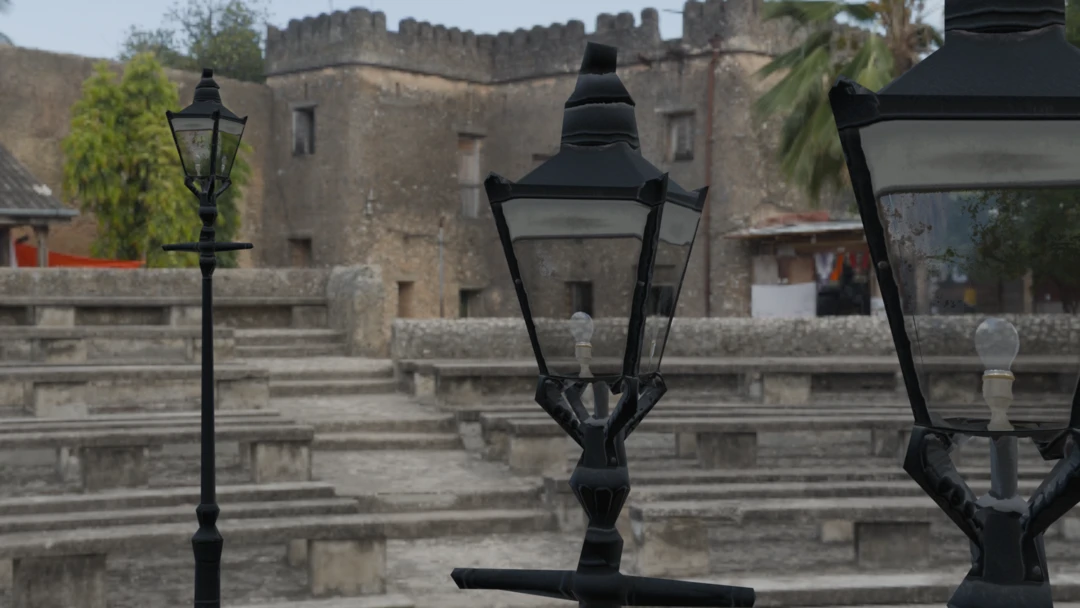
Lamp: Alpha blending for opacity channel
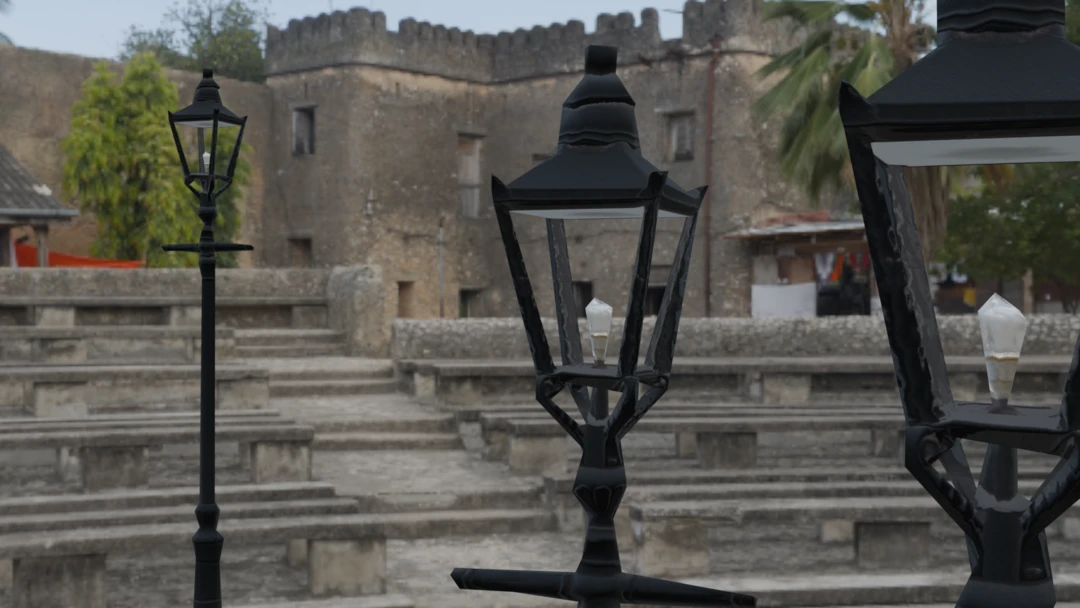
Lastly we will look at an asset with multiple layers of transparent materials. The street lamp has both a glass material for the lamp cover and the lightbulb itself is also transparent.
Here we blend the opacity channel similar to how we blended the other channels before. As before we also do a check for backface culling.
float4 CalculateOpacityChannel()
{
    // If the surface normal is facing away from the destination normal, we discard the value. We consider this to be a one sided material.
    if (dot(normalize(Normal), normalize(sg_DestinationNormal)) <= 0.0f){
        sg_DiscardValue = true;
        return sg_PreviousValue;
    }

    float4 opacitySample = OpacityTexture.SampleLevel(OpacityTextureSamplerState, TexCoord,0);

    float srcAlpha = saturate(opacitySample.r);

    if (srcAlpha <= 0.0f) {
        sg_DiscardValue = true;
        return sg_PreviousValue;
    }

    if (sg_HasPreviousValue) {
        float prevAlpha = sg_PreviousValue.r;
        float outAlpha = srcAlpha + prevAlpha * (1.0f - srcAlpha);
        return float4(outAlpha, outAlpha, outAlpha, outAlpha);
    }

    return float4(srcAlpha, srcAlpha, srcAlpha, srcAlpha);
}
Here is our optimized street lamp. If we look closely we can see that both the glass cover and the light bulb have transparency in the output material.
The lamp socket does not retain the metallic look completely since we are blending the metallic channel with the glass material on top. Metallic is supposed to be either 0 or 1, so blending it results in a non-physical value.
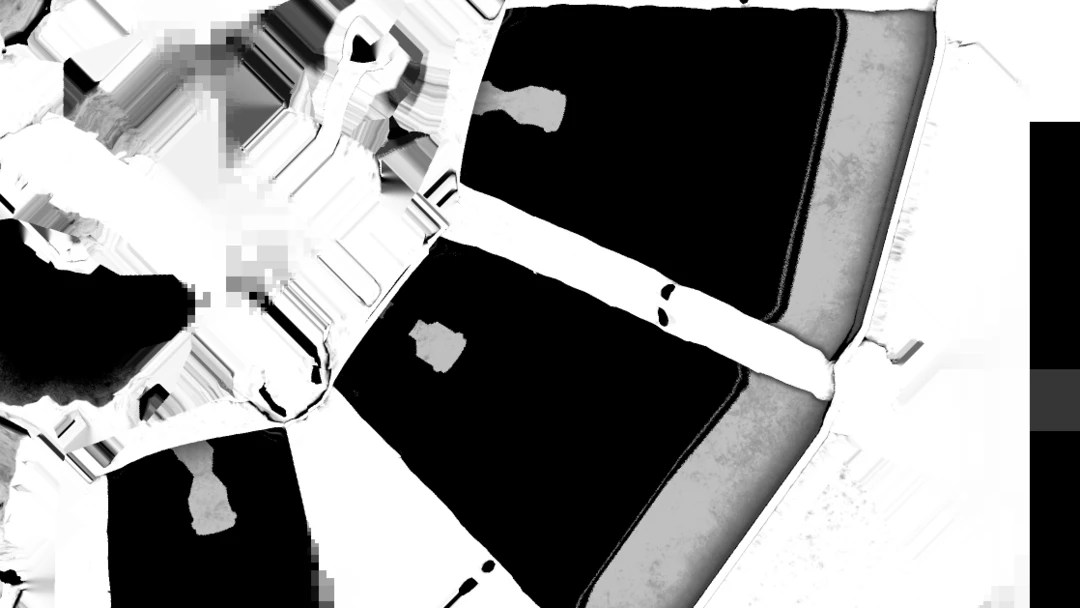
We can also notice that the light bulb is baked to each side of the street lamp, resulting in us having four light bulbs in the proxy model. Depending on render distance this might not be a problem, but if we have distinct objects viewed from behind transparent material then we might need to rethink our approach.
The alternative, perhaps better approach for our street lamp would be to exclude the glass material from the remeshing process. We probably do not want a distant object to render with transparency anyway. Since the glass is very transparent we can probably get away with just rendering the street lamp without the glass at a distance.
Result
Alpha blending can be a powerful tool when creating proxy models for assets with transparent materials. Here is the resulting statistics for the assets we used in this blog. To make it easier to understand and see the difference between the optimized model and the original we used quite high texture resolution and OnScreenSize. In a real world scenario these values can be toned down to get even smaller output models.
- OnScreenSize: 250
- HoleFilling: High
| Asset | Triangle count | Textures |
|---|---|---|
| Street Lamp Original | 30 k | 5x 4096x4096 |
| Street Lamp Remeshed | 390 | 5x 2048x2048 |
| Street Lamp, Remeshed without transparent parts | 472 | 4x 2048x2048 (we can skip opacity) |
| Security Camera 1 Original | 14 k | 5x 4096x4096 |
| Security Camera 1 Optimized | 568 | 4x 2048x2048 (we can skip opacity) |
| Security Camera 2 Original | 12 k | 5x 4096x4096 |
| Security Camera 2 Optimized | 554 | 4x 2048x2048 (we can skip opacity) |
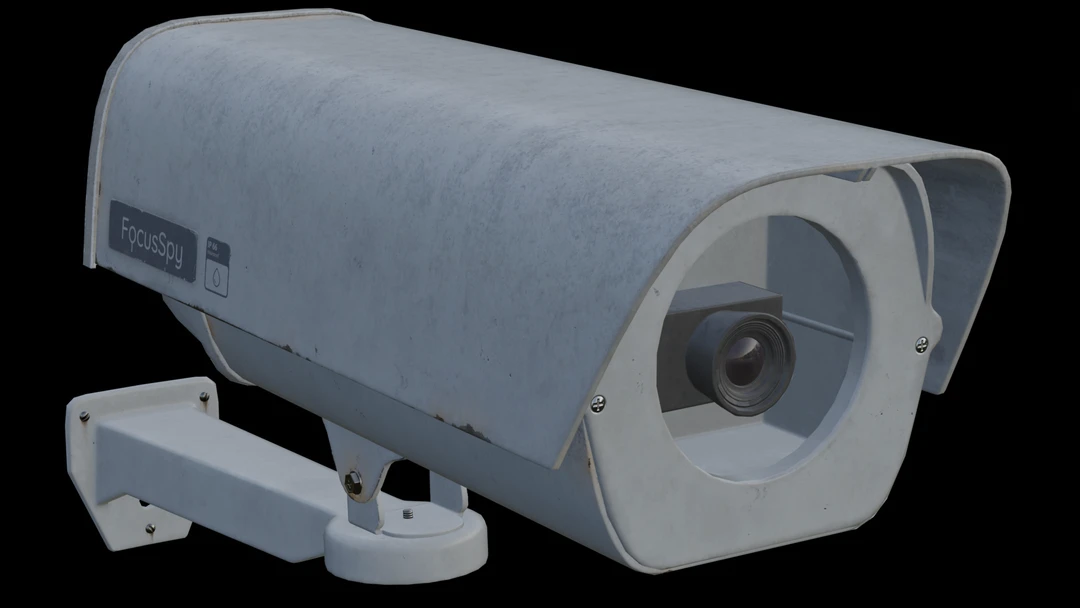
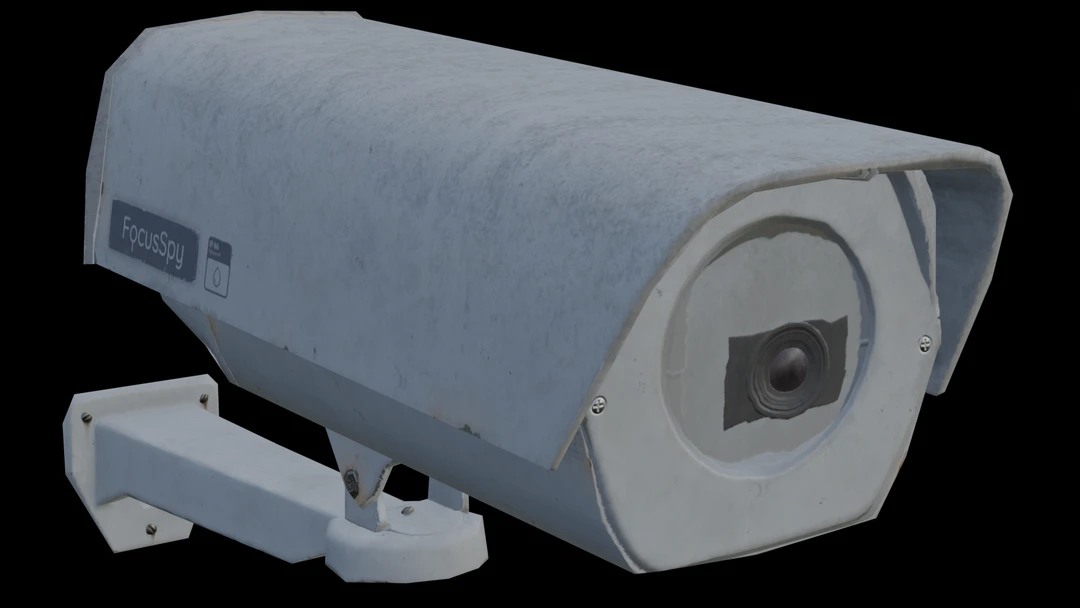
However, it is important to understand the limitations of this approach. The parallax effect gets lost when blending multiple layers into one. The asset looks best if it is viewed directly from the angle perpendicular to the proxy surface. If we view it from a steep angle it is quite apparent that we have a flat surface with textures applied to it.
We can also discuss how 'correct' our blended output is for roughness, normals and metallic channels. It is very possible that we find assets and materials where we need to tweak our blending approach to get the desired look. It is important to keep in mind that the goal of our proxy models is to look good at a distance, so looking at it as close as we have done in this blog is not a good idea. My advice is to not think about how correct the blending is, but rather focus on getting a visually pleasing result.
Complete scripts
ComputeCasting.py
# Copyright (c) Microsoft Corporation.
# Licensed under the MIT License.

import gc
import os

from simplygon10 import simplygon_loader
from simplygon10 import Simplygon

# Channels to cast
# Tuple of: material name, output color space, fill mode, dilation, pixel format
MATERIAL_CHANNELS = [("Diffuse", Simplygon.EImageColorSpace_sRGB, Simplygon.EAtlasFillMode_Interpolate, 40, Simplygon.EPixelFormat_R8G8B8),
                     ("Roughness", Simplygon.EImageColorSpace_Linear, Simplygon.EAtlasFillMode_Interpolate, 40, Simplygon.EPixelFormat_R8G8B8),
                     ("Metallic", Simplygon.EImageColorSpace_Linear, Simplygon.EAtlasFillMode_Interpolate, 40, Simplygon.EPixelFormat_R8G8B8),
                     ("Opacity", Simplygon.EImageColorSpace_Linear, Simplygon.EAtlasFillMode_NoFill, 0, Simplygon.EPixelFormat_R8G8B8),
                     ("Normals", Simplygon.EImageColorSpace_Linear, Simplygon.EAtlasFillMode_Interpolate, 40, Simplygon.EPixelFormat_R8G8B8)]

# Output settings
OUTPUT_FOLDER = "output"
OUTPUT_TEXTURE_FOLDER = f"{OUTPUT_FOLDER}/textures"

# Input settings
INPUT_FOLDER = "input"
FILE_ENDING = ".fbx"


def load_scene(sg: Simplygon.ISimplygon, path: str) -> Simplygon.spScene:
    """Load scene from path and return a Simplygon scene."""

    scene_importer = sg.CreateSceneImporter()
    scene_importer.SetImportFilePath(path)

    import_result = scene_importer.Run()
    if Simplygon.Failed(import_result):
        raise Exception('Failed to load scene.')

    scene = scene_importer.GetScene()
    return scene


def save_scene(sg: Simplygon.ISimplygon, sgScene: Simplygon.spScene, path: str):
    """Save scene to path."""

    scene_exporter = sg.CreateSceneExporter()
    scene_exporter.SetExportFilePath(path)
    scene_exporter.SetScene(sgScene)

    print (f"Saving {path}...")

    export_result = scene_exporter.Run()
    if Simplygon.Failed(export_result):
        raise Exception('Failed to save scene.')

def create_remeshing_pipline(sg: Simplygon.ISimplygon, screen_size : int, texture_size : int, hole_filling) -> Simplygon.spRemeshingPipeline:
    """Create remeshing pipeline with specified quality settings."""

    pipeline = sg.CreateRemeshingPipeline()
    settings = pipeline.GetRemeshingSettings()
    settings.SetOnScreenSize(screen_size)
    settings.SetHoleFilling(hole_filling)

    mapping_image_settings = pipeline.GetMappingImageSettings()
    mapping_image_settings.SetGenerateMappingImage(True)
    mapping_image_settings.SetGenerateTangents(True)
    mapping_image_settings.SetGenerateTexCoords(True)
    mapping_image_settings.SetMaximumLayers(6) # Numbers of layers that can be overlapping

    material_output_settings = mapping_image_settings.GetOutputMaterialSettings(0)
    material_output_settings.SetTextureHeight(texture_size)
    material_output_settings.SetTextureWidth(texture_size)
    material_output_settings.SetMultisamplingLevel(2)
    material_output_settings.SetGutterSpace(4)

    mapping_image_settings.SetTexCoordName("MaterialLOD")

    return pipeline


def create_compute_caster(sg : Simplygon.ISimplygon, channel_name : str, color_space, fill_mode, dilation, output_pixel_format, output_path : str) -> Simplygon.spComputeCaster:
    """Create compute caster for specified channel."""

    print(f"Creating compute caster for {channel_name}")
    caster = sg.CreateComputeCaster()
    caster.SetOutputFilePath(output_path)

    caster_settings = caster.GetComputeCasterSettings()
    caster_settings.SetMaterialChannel(channel_name)
    caster_settings.SetOutputColorSpace(color_space)

    caster_settings.SetOutputPixelFormat(output_pixel_format)
    caster_settings.SetOutputImageFileFormat( Simplygon.EImageOutputFormat_PNG )
    caster_settings.SetDilation(dilation)
    caster_settings.SetFillMode(fill_mode)
    return caster


def remesh_asset(sg: Simplygon.ISimplygon, input_asset : str, asset_name : str):
    """Billboard the specified asset and use compute casters to transfer materials using serialized material description."""

    # Load scene
    print(f"Loading {input_asset}")
    scene = load_scene(sg, input_asset)

    # Load material description file
    material_description_file = f"{INPUT_FOLDER}/{asset_name}.xml"
    print(f"Load scene material description from {material_description_file}")
    scene_description_serializer = sg.CreateMaterialEvaluationShaderSerializer()
    scene_description_serializer.LoadSceneMaterialEvaluationShadersFromFile(material_description_file, scene)

    # Create remeshing pipeline
    pipeline = create_remeshing_pipeline(sg, 250, 2048, Simplygon.EHoleFilling_High)

    # Add compute casters for all material channels
    for channel in MATERIAL_CHANNELS:
        compute_caster = create_compute_caster(sg, channel[0], channel[1], channel[2], channel[3], channel[4], f"{OUTPUT_TEXTURE_FOLDER}/{asset_name}_{channel[0]}" )
        pipeline.AddMaterialCaster( compute_caster, 0 )

    # Perform remeshing and material casting
    print("Performing optimization...")
    pipeline.RunScene(scene, Simplygon.EPipelineRunMode_RunInThisProcess)

    # Check if we received any errors
    print("Check log for any warnings or errors.")
    check_log(sg)

    # Since we output textures from material casters we clean texture table before saving the scenes.
    # Otherwise we (depending on output file format) get the same texture twice on hard drive.
    scene.GetTextureTable().Clear()

    # Save scene
    save_scene(sg, scene, f"{OUTPUT_FOLDER}/{asset_name}{FILE_ENDING}")


def check_log(sg: Simplygon.ISimplygon):
    """Outputs any errors or warnings from Simplygon."""

    # Check if any errors occurred.
    has_errors = sg.ErrorOccurred()
    if has_errors:
        errors = sg.CreateStringArray()
        sg.GetErrorMessages(errors)
        error_count = errors.GetItemCount()
        if error_count > 0:
            print('CheckLog: Errors:')
            for error_index in range(error_count):
                error_message = errors.GetItem(error_index)
                print(error_message)
            sg.ClearErrorMessages()
    else:
        print('CheckLog: No errors.')

    # Check if any warnings occurred.
    has_warnings = sg.WarningOccurred()
    if has_warnings:
        warnings = sg.CreateStringArray()
        sg.GetWarningMessages(warnings)
        warning_count = warnings.GetItemCount()
        if warning_count > 0:
            print('CheckLog: Warnings:')
            for warning_index in range(warning_count):
                warning_message = warnings.GetItem(warning_index)
                print(warning_message)
            sg.ClearWarningMessages()
    else:
        print('CheckLog: No warnings.')

    # Error out if Simplygon has errors.
    if has_errors:
        raise Exception('Processing failed with an error')


def process_asset(asset : str):
    """Initialize Simplygon and process asset."""

    asset_name = asset.replace(FILE_ENDING, "")

    sg = simplygon_loader.init_simplygon()
    sg.SetGlobalEnableLogSetting( True )

    if sg is None:
        exit(Simplygon.GetLastInitializationError())

    remesh_asset(sg, f"{INPUT_FOLDER}/{asset}", asset_name)


if __name__ == '__main__':
    for asset in os.listdir(INPUT_FOLDER):
        if FILE_ENDING in asset:
            process_asset(asset)
            gc.collect()
AlphaBlendedMaterial.hlsl
float4 CalculateDiffuseChannel()
{
    // If the surface normal is facing away from the destination normal, we discard the value. We consider this to be a one sided material.
    if (dot(normalize(Normal), normalize(sg_DestinationNormal)) <= 0.0f){
        sg_DiscardValue = true;
        return sg_PreviousValue;
    }

    float4 color = DiffuseTexture.SampleLevel(DiffuseTextureSamplerState, TexCoord,0);
    float4 opacity = OpacityTexture.SampleLevel(OpacityTextureSamplerState, TexCoord,0);

    if (opacity.r <= 0.0f) {
        sg_DiscardValue = true;
        return sg_PreviousValue;
	}

    float srcAlpha = saturate(opacity.r);
    if (sg_HasPreviousValue) {
        return color * srcAlpha + sg_PreviousValue * (1.0f - srcAlpha);
    }

    return color;
}

float4 CalculateMetallicChannel()
{
    // If the surface normal is facing away from the destination normal, we discard the value. We consider this to be a one sided material.
    if (dot(normalize(Normal), normalize(sg_DestinationNormal)) <= 0.0f){
        sg_DiscardValue = true;
        return sg_PreviousValue;
    }

    float4 opacity = OpacityTexture.SampleLevel(OpacityTextureSamplerState, TexCoord,0);
    if (opacity.r <= 0.0f) {
        sg_DiscardValue = true;
        return sg_PreviousValue;
	}

    float4 metal = MetallicTexture.SampleLevel(MetallicTextureSamplerState, TexCoord,0);
    float srcAlpha = saturate(opacity.r);
    if (sg_HasPreviousValue) {
        return metal * srcAlpha + sg_PreviousValue * (1.0f - srcAlpha);
    }

    return metal;
}

float4 CalculateOpacityChannel()
{
    // If the surface normal is facing away from the destination normal, we discard the value. We consider this to be a one sided material.
    if (dot(normalize(Normal), normalize(sg_DestinationNormal)) <= 0.0f){
        sg_DiscardValue = true;
        return sg_PreviousValue;
    }

    float4 opacitySample = OpacityTexture.SampleLevel(OpacityTextureSamplerState, TexCoord,0);

    float srcAlpha = saturate(opacitySample.r);

    if (srcAlpha <= 0.0f) {
        sg_DiscardValue = true;
        return sg_PreviousValue;
    }

    if (sg_HasPreviousValue) {
        float prevAlpha = sg_PreviousValue.r;
        float outAlpha = srcAlpha + prevAlpha * (1.0f - srcAlpha);
        return float4(outAlpha, outAlpha, outAlpha, outAlpha);
    }

    return float4(srcAlpha, srcAlpha, srcAlpha, srcAlpha);
}

float4 CalculateRoughnessChannel()
{
    // If the surface normal is facing away from the destination normal, we discard the value. We consider this to be a one sided material.
    if (dot(normalize(Normal), normalize(sg_DestinationNormal)) <= 0.0f){
        sg_DiscardValue = true;
        return sg_PreviousValue;
    }

    float4 opacity = OpacityTexture.SampleLevel(OpacityTextureSamplerState, TexCoord,0);
    if (opacity.r <= 0.0f) {
        sg_DiscardValue = true;
        return sg_PreviousValue;
	}
    float srcAlpha = saturate(opacity.r);

    float4 roughness = RoughnessTexture.SampleLevel(RoughnessTextureSamplerState, TexCoord,0);

    if (sg_HasPreviousValue) {
        return roughness * srcAlpha + sg_PreviousValue * (1.0f - srcAlpha);
    }

    return roughness;
}

// The CalculateNormalsChannel calculates the per-texel normals of the output tangent-space normal map. It starts by sampling the input
// tangent-space normal map of the input geometry, and transforms the normal into object-space coordinates. It then uses the generated
// destination tangent basis vectors to transform the normal vector into the output tangent-space.

float4 CalculateNormalsChannel()
{
    // If the surface normal is facing away from the destination normal, we discard the value. We consider this to be a one sided material.
    if (dot(normalize(Normal), normalize(sg_DestinationNormal)) <= 0.0f){
        sg_DiscardValue = true;
        return sg_PreviousValue;
    }

    float4 opacity = OpacityTexture.SampleLevel(OpacityTextureSamplerState, TexCoord,0);
    float srcAlpha = saturate(opacity.r);
    if (srcAlpha.r <= 0.0f) {
        if (sg_HasPreviousValue) {
            return sg_PreviousValue;
        } else {
            sg_DiscardValue = true;
            return float4(0.5,0.5,1,0);
        }
	}

    float3 tangentSpaceNormal = (NormalTexture.SampleLevel(NormalTextureSamplerState, TexCoord,0).xyz * 2.0) - 1.0;

	// transform into an object-space vector
	float3 objectSpaceNormal = 	tangentSpaceNormal.x * normalize(Tangent) +
								tangentSpaceNormal.y * normalize(Bitangent) +
								tangentSpaceNormal.z * normalize(Normal);

	// transform the object-space vector into the destination tangent space
	tangentSpaceNormal.x = dot( objectSpaceNormal , normalize(sg_DestinationTangent) );
	tangentSpaceNormal.y = dot( objectSpaceNormal , normalize(sg_DestinationBitangent) );
	tangentSpaceNormal.z = dot( objectSpaceNormal , normalize(sg_DestinationNormal) );

	// normalize, the tangent basis is not necessarily orthogonal
	tangentSpaceNormal = normalize(tangentSpaceNormal);

    if (sg_HasPreviousValue) {
        // Let us try to transform our previous value to destination tangent space as well
        float3 previousValueTangentSpace = (sg_PreviousValue * 2.0) - 1.0;

        // Technically wrong but close enough...?
        tangentSpaceNormal = tangentSpaceNormal * srcAlpha + previousValueTangentSpace * (1.0f - srcAlpha);
        tangentSpaceNormal = normalize(tangentSpaceNormal);
    }
	return float4( ((tangentSpaceNormal + 1.0)/2.0) , 1.0);
}
GlassMaterial.hlsl
float4 CalculateDiffuseChannel()
{
    // If the surface normal is facing away from the destination normal, we discard the value. We consider this to be a one sided material.
    if (dot(normalize(Normal), normalize(sg_DestinationNormal)) <= 0.0f){
        sg_DiscardValue = true;
        return sg_PreviousValue;
    }

    float4 color = DiffuseTexture.SampleLevel(DiffuseTextureSamplerState, TexCoord,0);
    float4 opacity = OpacityTexture.SampleLevel(OpacityTextureSamplerState, TexCoord,0);

    if (opacity.r <= 0.0f) {
        sg_DiscardValue = true;
        return sg_PreviousValue;
	}

    float srcAlpha = saturate(opacity.r);
    if (sg_HasPreviousValue) {
        return color * srcAlpha + sg_PreviousValue * (1.0f - srcAlpha);
    }

    return color;
}

float4 CalculateMetallicChannel()
{
    // If the surface normal is facing away from the destination normal, we discard the value. We consider this to be a one sided material.
    if (dot(normalize(Normal), normalize(sg_DestinationNormal)) <= 0.0f){
        sg_DiscardValue = true;
        return sg_PreviousValue;
    }

    float4 opacity = OpacityTexture.SampleLevel(OpacityTextureSamplerState, TexCoord,0);
    if (opacity.r <= 0.0f) {
        sg_DiscardValue = true;
        return sg_PreviousValue;
	}

    float4 metal = MetallicTexture.SampleLevel(MetallicTextureSamplerState, TexCoord,0);
    return metal;
}

float4 CalculateOpacityChannel()
{
    // If the surface normal is facing away from the destination normal, we discard the value. We consider this to be a one sided material.
    if (dot(normalize(Normal), normalize(sg_DestinationNormal)) <= 0.0f){
        sg_DiscardValue = true;
        return sg_PreviousValue;
    }

    float4 opacitySample = OpacityTexture.SampleLevel(OpacityTextureSamplerState, TexCoord,0);

    float srcAlpha = saturate(opacitySample.r);

    if (srcAlpha <= 0.0f) {
        sg_DiscardValue = true;
        return sg_PreviousValue;
    }

    if (sg_HasPreviousValue) {
        float prevAlpha = sg_PreviousValue.r;
        float outAlpha = srcAlpha + prevAlpha * (1.0f - srcAlpha);
        return float4(outAlpha, outAlpha, outAlpha, outAlpha);
    }

    return float4(srcAlpha, srcAlpha, srcAlpha, srcAlpha);
}

float4 CalculateRoughnessChannel()
{
    // If the surface normal is facing away from the destination normal, we discard the value. We consider this to be a one sided material.
    if (dot(normalize(Normal), normalize(sg_DestinationNormal)) <= 0.0f){
        sg_DiscardValue = true;
        return sg_PreviousValue;
    }

    float4 opacity = OpacityTexture.SampleLevel(OpacityTextureSamplerState, TexCoord,0);
    if (opacity.r <= 0.0f) {
        sg_DiscardValue = true;
        return sg_PreviousValue;
	}

    float4 roughness = RoughnessTexture.SampleLevel(RoughnessTextureSamplerState, TexCoord,0);
    return roughness;
}

// The CalculateNormalsChannel calculates the per-texel normals of the output tangent-space normal map. It starts by sampling the input
// tangent-space normal map of the input geometry, and transforms the normal into object-space coordinates. It then uses the generated
// destination tangent basis vectors to transform the normal vector into the output tangent-space.

float4 CalculateNormalsChannel()
{
    // If the surface normal is facing away from the destination normal, we discard the value. We consider this to be a one sided material.
    if (dot(normalize(Normal), normalize(sg_DestinationNormal)) <= 0.0f){
        sg_DiscardValue = true;
        return sg_PreviousValue;
    }

    float4 opacity = OpacityTexture.SampleLevel(OpacityTextureSamplerState, TexCoord,0);
    if (opacity.r <= 0.0f) {
        sg_DiscardValue = true;
        return sg_PreviousValue;
	}

    float3 tangentSpaceNormal = (NormalTexture.SampleLevel(NormalTextureSamplerState, TexCoord,0).xyz * 2.0) - 1.0;

	// transform into an object-space vector
	float3 objectSpaceNormal = 	tangentSpaceNormal.x * normalize(Tangent) +
								tangentSpaceNormal.y * normalize(Bitangent) +
								tangentSpaceNormal.z * normalize(Normal);

	// transform the object-space vector into the destination tangent space
	tangentSpaceNormal.x = dot( objectSpaceNormal , normalize(sg_DestinationTangent) );
	tangentSpaceNormal.y = dot( objectSpaceNormal , normalize(sg_DestinationBitangent) );
	tangentSpaceNormal.z = dot( objectSpaceNormal , normalize(sg_DestinationNormal) );

	// normalize, the tangent basis is not necessarily orthogonal
	tangentSpaceNormal = normalize(tangentSpaceNormal);

	// encode into [0 -> 1] basis and return
	return float4( ((tangentSpaceNormal + 1.0)/2.0) , 1.0);
}
BasicMaterial.hlsl
// Sample Diffuse texture for diffuse channel
float4 CalculateDiffuseChannel()
{
    float4 color = DiffuseTexture.SampleLevel(DiffuseTextureSamplerState, TexCoord,0);
    return color;
}

// Sample Roughness texture for roughness channel
float4 CalculateRoughnessChannel()
{
    float4 roughness = RoughnessTexture.SampleLevel(RoughnessTextureSamplerState, TexCoord,0);
    return roughness;
}

// Sample Metal texture
float4 CalculateMetallicChannel()
{
    float4 metal = MetallicTexture.SampleLevel(MetallicTextureSamplerState, TexCoord,0);
    return metal;
}

// Opacity channel for an opaque material is always white
float4 CalculateOpacityChannel()
{
    return float4(1,1,1,1);
}

// The CalculateNormalsChannel calculates the per-texel normals of the output tangent-space normal map. It starts by sampling the input
// tangent-space normal map of the input geometry, and transforms the normal into object-space coordinates. It then uses the generated
// destination tangent basis vectors to transform the normal vector into the output tangent-space.
float4 CalculateNormalsChannel()
{
    float3 tangentSpaceNormal = (NormalTexture.SampleLevel(NormalTextureSamplerState, TexCoord,0).xyz * 2.0) - 1.0;

	// transform into an object-space vector
	float3 objectSpaceNormal = 	tangentSpaceNormal.x * normalize(Tangent) +
								tangentSpaceNormal.y * normalize(Bitangent) +
								tangentSpaceNormal.z * normalize(Normal);

	// transform the object-space vector into the destination tangent space
	tangentSpaceNormal.x = dot( objectSpaceNormal , normalize(sg_DestinationTangent) );
	tangentSpaceNormal.y = dot( objectSpaceNormal , normalize(sg_DestinationBitangent) );
	tangentSpaceNormal.z = dot( objectSpaceNormal , normalize(sg_DestinationNormal) );

	// normalize, the tangent basis is not necessarily orthogonal
	tangentSpaceNormal = normalize(tangentSpaceNormal);

	// encode into [0 -> 1] basis and return
	return float4( ((tangentSpaceNormal + 1.0)/2.0) , 1.0);
}
security_camera_01_4k.xml
<?xml version="1.0" encoding="UTF-8"?>

<Scene>

    <TextureTable>
        <Texture Name="security_camera_01_diff_4k" FilePath="input/textures/security_camera_01_diff_4k.jpg"  ColorSpace="sRGB"/>
        <Texture Name="security_camera_01_nor_gl_4k" FilePath="input/textures/security_camera_01_nor_gl_4k.exr" ColorSpace="Linear"/>
        <Texture Name="security_camera_01_rough_4k" FilePath="input/textures/security_camera_01_rough_4k.png" ColorSpace="Linear"/>
        <Texture Name="security_camera_01_metal_4k" FilePath="input/textures/security_camera_01_metal_4k.png" ColorSpace="Linear"/>
        <Texture Name="security_camera_01_opacity_4k" FilePath="input/textures/security_camera_01_opacity_4k.png" ColorSpace="Linear"/>
    </TextureTable>

	<MaterialTable>
        <Material Name="security_camera_01">
            <MaterialEvaluationShader Version="0.4.0" ShaderLanguage="HLSL" ShaderFilePath="shaders/BasicMaterial.hlsl">

                <Attribute Name="TexCoord" FieldType="TexCoords" FieldName="0" FieldFormat="F32vec2"/>
                <Attribute Name="Tangent" FieldType="Tangents" FieldFormat="F32vec3"/>
                <Attribute Name="Bitangent" FieldType="Bitangents" FieldFormat="F32vec3"/>
                <Attribute Name="Normal" FieldType="Normals" FieldFormat="F32vec3"/>

				<EvaluationFunction Channel="Diffuse" EntryPoint="CalculateDiffuseChannel"/>
				<EvaluationFunction Channel="Roughness" EntryPoint="CalculateRoughnessChannel"/>
                <EvaluationFunction Channel="Normals" EntryPoint="CalculateNormalsChannel"/>
                <EvaluationFunction Channel="Opacity" EntryPoint="CalculateOpacityChannel"/>
                <EvaluationFunction Channel="Metallic" EntryPoint="CalculateMetallicChannel"/>

                <ShaderParameterSamplerState Name="Sampler2D" MinFilter="Linear" MagFilter="Linear" AddressU="Repeat" AddressV="Repeat" AddressW="Repeat" />

                <ShaderParameterSampler Name="DiffuseTexture" SamplerState="Sampler2D" TextureName="security_camera_01_diff_4k"/>
                <ShaderParameterSampler Name="RoughnessTexture" SamplerState="Sampler2D" TextureName="security_camera_01_rough_4k"/>
                <ShaderParameterSampler Name="MetallicTexture" SamplerState="Sampler2D" TextureName="security_camera_01_metal_4k"/>
                <ShaderParameterSampler Name="NormalTexture" SamplerState="Sampler2D" TextureName="security_camera_01_nor_gl_4k"/>
            </MaterialEvaluationShader>
        </Material>

        <Material Name="security_camera_01_glass">
            <MaterialEvaluationShader Version="0.4.0" ShaderLanguage="HLSL" ShaderFilePath="shaders/AlphaBlendedMaterial.hlsl">

                <Attribute Name="TexCoord" FieldType="TexCoords" FieldName="0" FieldFormat="F32vec2"/>
                <Attribute Name="Tangent" FieldType="Tangents" FieldFormat="F32vec3"/>
                <Attribute Name="Bitangent" FieldType="Bitangents" FieldFormat="F32vec3"/>
                <Attribute Name="Normal" FieldType="Normals" FieldFormat="F32vec3"/>

				<EvaluationFunction Channel="Diffuse" EntryPoint="CalculateDiffuseChannel"/>
				<EvaluationFunction Channel="Roughness" EntryPoint="CalculateRoughnessChannel"/>
                <EvaluationFunction Channel="Normals" EntryPoint="CalculateNormalsChannel"/>
                <EvaluationFunction Channel="Opacity" EntryPoint="CalculateOpacityChannel"/>
                <EvaluationFunction Channel="Metallic" EntryPoint="CalculateMetallicChannel"/>

                <ShaderParameterSamplerState Name="Sampler2D" MinFilter="Linear" MagFilter="Linear" AddressU="Repeat" AddressV="Repeat" AddressW="Repeat" />

                <ShaderParameterSampler Name="DiffuseTexture" SamplerState="Sampler2D" TextureName="security_camera_01_diff_4k"/>
                <ShaderParameterSampler Name="RoughnessTexture" SamplerState="Sampler2D" TextureName="security_camera_01_rough_4k"/>
                <ShaderParameterSampler Name="NormalTexture" SamplerState="Sampler2D" TextureName="security_camera_01_nor_gl_4k"/>
                <ShaderParameterSampler Name="MetallicTexture" SamplerState="Sampler2D" TextureName="security_camera_01_metal_4k"/>
                <ShaderParameterSampler Name="OpacityTexture" SamplerState="Sampler2D" TextureName="security_camera_01_opacity_4k"/>
            </MaterialEvaluationShader>
        </Material>

	</MaterialTable>

</Scene>
security_camera_02_4k.xml
<?xml version="1.0" encoding="UTF-8"?>

<Scene>

    <TextureTable>
        <Texture Name="security_camera_02_diff_4k" FilePath="input/textures/security_camera_02_diff_4k.jpg"  ColorSpace="sRGB"/>
        <Texture Name="security_camera_02_nor_gl_4k" FilePath="input/textures/security_camera_02_nor_gl_4k.exr" ColorSpace="Linear"/>
        <Texture Name="security_camera_02_rough_4k" FilePath="input/textures/security_camera_02_rough_4k.png" ColorSpace="Linear"/>
        <Texture Name="security_camera_02_metal_4k" FilePath="input/textures/security_camera_02_metal_4k.png" ColorSpace="Linear"/>
        <Texture Name="security_camera_02_opacity_4k" FilePath="input/textures/security_camera_02_opacity_4k.png" ColorSpace="Linear"/>
    </TextureTable>

	<MaterialTable>
        <Material Name="security_camera_02">
            <MaterialEvaluationShader Version="0.4.0" ShaderLanguage="HLSL" ShaderFilePath="shaders/BasicMaterial.hlsl">

                <Attribute Name="TexCoord" FieldType="TexCoords" FieldName="0" FieldFormat="F32vec2"/>
                <Attribute Name="Tangent" FieldType="Tangents" FieldFormat="F32vec3"/>
                <Attribute Name="Bitangent" FieldType="Bitangents" FieldFormat="F32vec3"/>
                <Attribute Name="Normal" FieldType="Normals" FieldFormat="F32vec3"/>

				<EvaluationFunction Channel="Diffuse" EntryPoint="CalculateDiffuseChannel"/>
				<EvaluationFunction Channel="Roughness" EntryPoint="CalculateRoughnessChannel"/>
                <EvaluationFunction Channel="Normals" EntryPoint="CalculateNormalsChannel"/>
                <EvaluationFunction Channel="Opacity" EntryPoint="CalculateOpacityChannel"/>
                <EvaluationFunction Channel="Metallic" EntryPoint="CalculateMetallicChannel"/>

                <ShaderParameterSamplerState Name="Sampler2D" MinFilter="Linear" MagFilter="Linear" AddressU="Repeat" AddressV="Repeat" AddressW="Repeat" />

                <ShaderParameterSampler Name="DiffuseTexture" SamplerState="Sampler2D" TextureName="security_camera_02_diff_4k"/>
                <ShaderParameterSampler Name="RoughnessTexture" SamplerState="Sampler2D" TextureName="security_camera_02_rough_4k"/>
                <ShaderParameterSampler Name="MetallicTexture" SamplerState="Sampler2D" TextureName="security_camera_02_metal_4k"/>
                <ShaderParameterSampler Name="NormalTexture" SamplerState="Sampler2D" TextureName="security_camera_02_nor_gl_4k"/>
            </MaterialEvaluationShader>
        </Material>

        <Material Name="security_camera_02_glass">
            <MaterialEvaluationShader Version="0.4.0" ShaderLanguage="HLSL" ShaderFilePath="shaders/GlassMaterial.hlsl">

                <Attribute Name="TexCoord" FieldType="TexCoords" FieldName="0" FieldFormat="F32vec2"/>
                <Attribute Name="Tangent" FieldType="Tangents" FieldFormat="F32vec3"/>
                <Attribute Name="Bitangent" FieldType="Bitangents" FieldFormat="F32vec3"/>
                <Attribute Name="Normal" FieldType="Normals" FieldFormat="F32vec3"/>

				<EvaluationFunction Channel="Diffuse" EntryPoint="CalculateDiffuseChannel"/>
				<EvaluationFunction Channel="Roughness" EntryPoint="CalculateRoughnessChannel"/>
                <EvaluationFunction Channel="Normals" EntryPoint="CalculateNormalsChannel"/>
                <EvaluationFunction Channel="Opacity" EntryPoint="CalculateOpacityChannel"/>
                <EvaluationFunction Channel="Metallic" EntryPoint="CalculateMetallicChannel"/>

                <ShaderParameterSamplerState Name="Sampler2D" MinFilter="Linear" MagFilter="Linear" AddressU="Repeat" AddressV="Repeat" AddressW="Repeat" />

                <ShaderParameterSampler Name="DiffuseTexture" SamplerState="Sampler2D" TextureName="security_camera_02_diff_4k"/>
                <ShaderParameterSampler Name="RoughnessTexture" SamplerState="Sampler2D" TextureName="security_camera_02_rough_4k"/>
                <ShaderParameterSampler Name="NormalTexture" SamplerState="Sampler2D" TextureName="security_camera_02_nor_gl_4k"/>
                <ShaderParameterSampler Name="MetallicTexture" SamplerState="Sampler2D" TextureName="security_camera_02_metal_4k"/>
                <ShaderParameterSampler Name="OpacityTexture" SamplerState="Sampler2D" TextureName="security_camera_02_opacity_4k"/>
            </MaterialEvaluationShader>
        </Material>

	</MaterialTable>

</Scene>
street_lamp_01_4k.xml
<?xml version="1.0" encoding="UTF-8"?>

<Scene>

    <TextureTable>
        <Texture Name="street_lamp_01_diff_4k" FilePath="input/textures/street_lamp_01_diff_4k.jpg"  ColorSpace="sRGB"/>
        <Texture Name="street_lamp_01_nor_gl_4k" FilePath="input/textures/street_lamp_01_nor_gl_4k.exr" ColorSpace="Linear"/>
        <Texture Name="street_lamp_01_rough_4k" FilePath="input/textures/street_lamp_01_rough_4k.png" ColorSpace="Linear"/>
        <Texture Name="street_lamp_01_metal_4k" FilePath="input/textures/street_lamp_01_metal_4k.png" ColorSpace="Linear"/>
        <Texture Name="street_lamp_01_opacity_4k" FilePath="input/textures/street_lamp_01_opacity_4k.png" ColorSpace="Linear"/>
    </TextureTable>

	<MaterialTable>
        <Material Name="street_lamp_01">
            <MaterialEvaluationShader Version="0.4.0" ShaderLanguage="HLSL" ShaderFilePath="shaders/BasicMaterial.hlsl">

                <Attribute Name="TexCoord" FieldType="TexCoords" FieldName="0" FieldFormat="F32vec2"/>
                <Attribute Name="Tangent" FieldType="Tangents" FieldFormat="F32vec3"/>
                <Attribute Name="Bitangent" FieldType="Bitangents" FieldFormat="F32vec3"/>
                <Attribute Name="Normal" FieldType="Normals" FieldFormat="F32vec3"/>

				<EvaluationFunction Channel="Diffuse" EntryPoint="CalculateDiffuseChannel"/>
				<EvaluationFunction Channel="Roughness" EntryPoint="CalculateRoughnessChannel"/>
                <EvaluationFunction Channel="Normals" EntryPoint="CalculateNormalsChannel"/>
                <EvaluationFunction Channel="Opacity" EntryPoint="CalculateOpacityChannel"/>
                <EvaluationFunction Channel="Metallic" EntryPoint="CalculateMetallicChannel"/>

                <ShaderParameterSamplerState Name="Sampler2D" MinFilter="Linear" MagFilter="Linear" AddressU="Repeat" AddressV="Repeat" AddressW="Repeat" />

                <ShaderParameterSampler Name="DiffuseTexture" SamplerState="Sampler2D" TextureName="street_lamp_01_diff_4k"/>
                <ShaderParameterSampler Name="RoughnessTexture" SamplerState="Sampler2D" TextureName="street_lamp_01_rough_4k"/>
                <ShaderParameterSampler Name="MetallicTexture" SamplerState="Sampler2D" TextureName="street_lamp_01_metal_4k"/>
                <ShaderParameterSampler Name="NormalTexture" SamplerState="Sampler2D" TextureName="street_lamp_01_nor_gl_4k"/>
            </MaterialEvaluationShader>
        </Material>

        <Material Name="street_lamp_01_glass">
            <MaterialEvaluationShader Version="0.4.0" ShaderLanguage="HLSL" ShaderFilePath="shaders/AlphaBlendedMaterial.hlsl">

                <Attribute Name="TexCoord" FieldType="TexCoords" FieldName="0" FieldFormat="F32vec2"/>
                <Attribute Name="Tangent" FieldType="Tangents" FieldFormat="F32vec3"/>
                <Attribute Name="Bitangent" FieldType="Bitangents" FieldFormat="F32vec3"/>
                <Attribute Name="Normal" FieldType="Normals" FieldFormat="F32vec3"/>

				<EvaluationFunction Channel="Diffuse" EntryPoint="CalculateDiffuseChannel"/>
				<EvaluationFunction Channel="Roughness" EntryPoint="CalculateRoughnessChannel"/>
                <EvaluationFunction Channel="Normals" EntryPoint="CalculateNormalsChannel"/>
                <EvaluationFunction Channel="Opacity" EntryPoint="CalculateOpacityChannel"/>
                <EvaluationFunction Channel="Metallic" EntryPoint="CalculateMetallicChannel"/>

                <ShaderParameterSamplerState Name="Sampler2D" MinFilter="Linear" MagFilter="Linear" AddressU="Repeat" AddressV="Repeat" AddressW="Repeat" />

                <ShaderParameterSampler Name="DiffuseTexture" SamplerState="Sampler2D" TextureName="street_lamp_01_diff_4k"/>
                <ShaderParameterSampler Name="RoughnessTexture" SamplerState="Sampler2D" TextureName="street_lamp_01_rough_4k"/>
                <ShaderParameterSampler Name="NormalTexture" SamplerState="Sampler2D" TextureName="street_lamp_01_nor_gl_4k"/>
                <ShaderParameterSampler Name="MetallicTexture" SamplerState="Sampler2D" TextureName="street_lamp_01_metal_4k"/>
                <ShaderParameterSampler Name="OpacityTexture" SamplerState="Sampler2D" TextureName="street_lamp_01_opacity_4k"/>
            </MaterialEvaluationShader>
        </Material>

        <Material Name="street_lamp_01_bulb">
            <MaterialEvaluationShader Version="0.4.0" ShaderLanguage="HLSL" ShaderFilePath="shaders/AlphaBlendedMaterial.hlsl">

                <Attribute Name="TexCoord" FieldType="TexCoords" FieldName="0" FieldFormat="F32vec2"/>
                <Attribute Name="Tangent" FieldType="Tangents" FieldFormat="F32vec3"/>
                <Attribute Name="Bitangent" FieldType="Bitangents" FieldFormat="F32vec3"/>
                <Attribute Name="Normal" FieldType="Normals" FieldFormat="F32vec3"/>

				<EvaluationFunction Channel="Diffuse" EntryPoint="CalculateDiffuseChannel"/>
				<EvaluationFunction Channel="Roughness" EntryPoint="CalculateRoughnessChannel"/>
                <EvaluationFunction Channel="Normals" EntryPoint="CalculateNormalsChannel"/>
                <EvaluationFunction Channel="Opacity" EntryPoint="CalculateOpacityChannel"/>
                <EvaluationFunction Channel="Metallic" EntryPoint="CalculateMetallicChannel"/>

                <ShaderParameterSamplerState Name="Sampler2D" MinFilter="Linear" MagFilter="Linear" AddressU="Repeat" AddressV="Repeat" AddressW="Repeat" />

                <ShaderParameterSampler Name="DiffuseTexture" SamplerState="Sampler2D" TextureName="street_lamp_01_diff_4k"/>
                <ShaderParameterSampler Name="RoughnessTexture" SamplerState="Sampler2D" TextureName="street_lamp_01_rough_4k"/>
                <ShaderParameterSampler Name="NormalTexture" SamplerState="Sampler2D" TextureName="street_lamp_01_nor_gl_4k"/>
                <ShaderParameterSampler Name="MetallicTexture" SamplerState="Sampler2D" TextureName="street_lamp_01_metal_4k"/>
                <ShaderParameterSampler Name="OpacityTexture" SamplerState="Sampler2D" TextureName="street_lamp_01_opacity_4k"/>
            </MaterialEvaluationShader>
        </Material>

	</MaterialTable>

</Scene>