Create vertex weights from skinning data

In this blog we will have a look at how to generate vertex weights from skinning data. This lets us use bones to control geometric density. In our case we will use it to make character faces more detailed than their bodies after reduction.
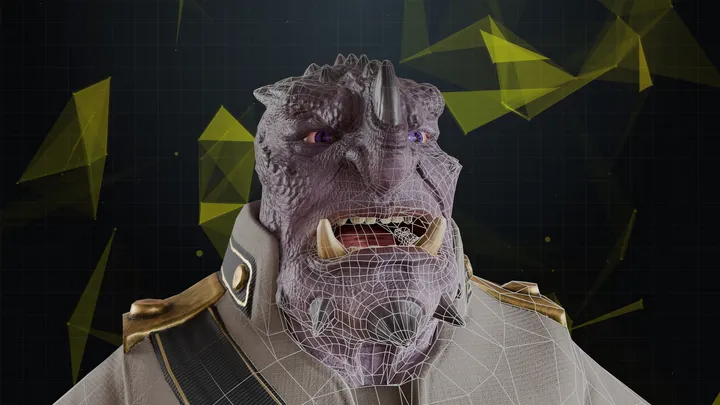
Disclaimer: The code in this post is written using version 10.4.366.0 of Simplygon. If you encounter this post at a later stage, some of the API calls might have changed. However, the core concepts should still remain valid.
Normally we suggest to use vertex colors to give artists control over geometry density. This is covered in the blogs Protecting features using vertex locks and weights and LOD0 character optimization using quad reduction and material baking . With vertex colors the artists have fine grained control over which areas are important. If such fine grained control is not needed, or it is problematic to paint every character asset, then we can use bones to determine which areas are important.
Prerequisites
This example will use the Simplygon Python API, but the same concepts can be applied to all other integrations of the Simplygon API.
Problem to solve
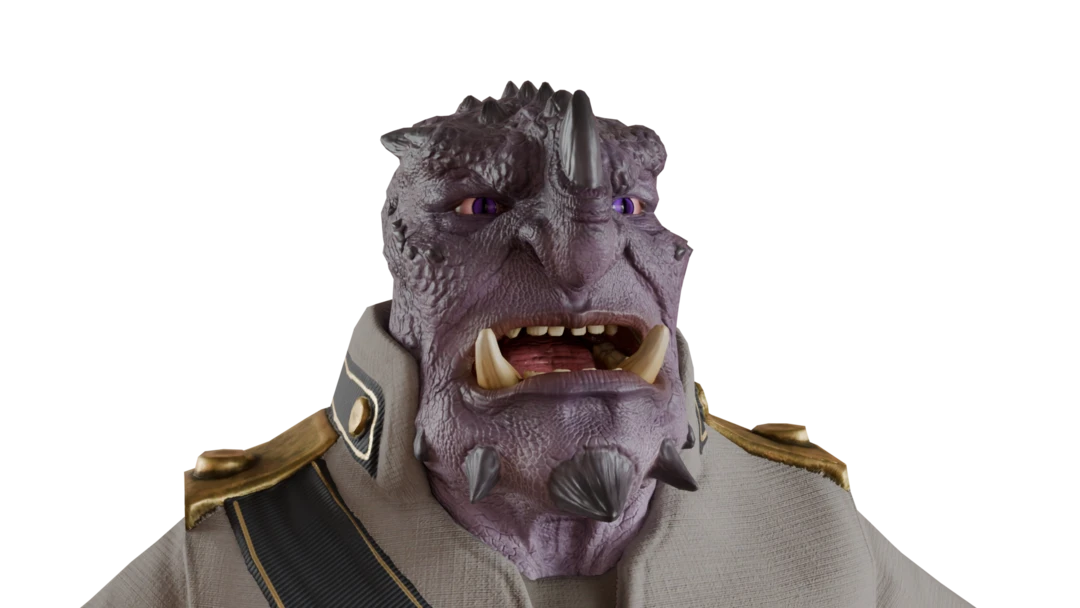
We want to reduce a character's asset. We know that the player will spend most time looking at the character's face, so we want to preserve that area as much as possible. The body is less important, so we can be more aggressive with the reduction there.
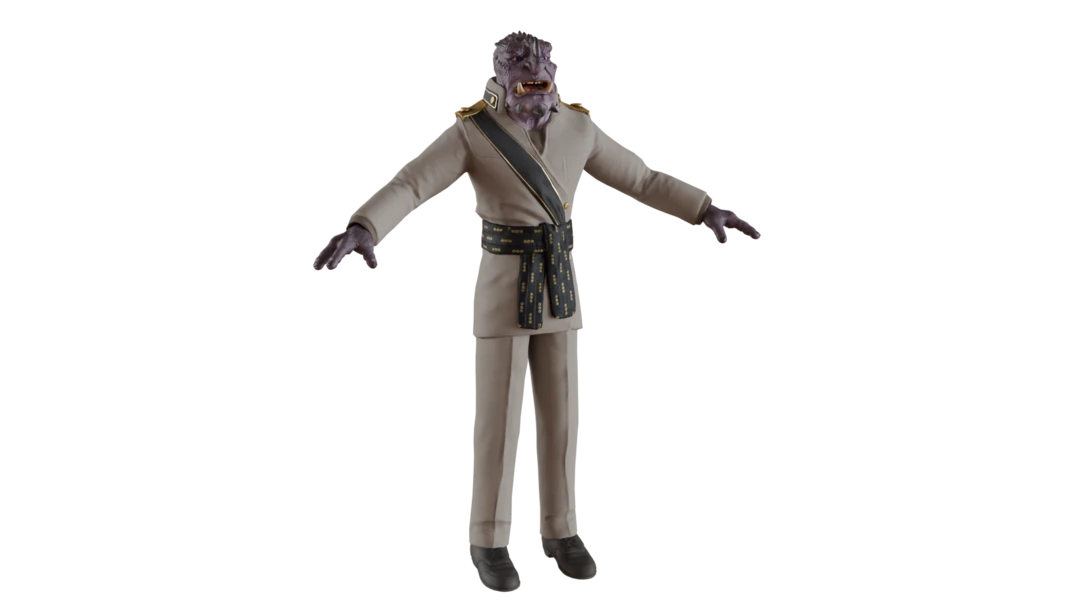
Normally we would use vertex colors to control this, but in this case we want to use the bones instead. The character bone structure looks like this. We want every vertex that is influenced by the head bone, or any below it to be more important.
...
|- CongressRhienolph_ Spine2
   |- CongressRhienolph_ R Clavicle
      |- ...
   |- CongressRhienolph_ L Clavicle
      |- ...
   |- CongressRhienolph_ Neck
      |- CongressRhienolph_ Head
        |- CongressRhienolph_ Ponytail1
        |- CongressRhienolph_Eye_R
        |- CongressRhienolph_Eye_L
        |- CongressRhienolph_Eyelid_L_Upper
        |- CongressRhienolph_Eyelid_L_Lower
        |- CongressRhienolph_Eyelid_R_Upper
        |- CongressRhienolph_Eyelid_R_Lower
Solution
The solution is to generate vertex weights based on the bone weights, then run reduction on the asset.
Bone importance array
First we need to determine which bones that are important. We will use a simple array where the index is the bone id and the value is the importance of that bone. So first we create this array from the bone table
def get_bone_weights(scene: Simplygon.spScene) -> list[float]:
    bones = scene.GetBoneTable()
    return [1] * bones.GetBonesCount()
After that we can use this function to set the importance of a single bone, or that bone and all its children.
def set_bone_importance(sg: Simplygon.ISimplygon, scene: Simplygon.spScene, bone_weights: list[float], bone_name: str, importance: float, recursive: bool):
    bones = scene.GetBoneTable()
    bone_id = bones.FindBoneId(bone_name)
    bone_weights[bone_id] = importance
    print(f"Bone {bone_name} set to importance {importance}.")

    if (recursive):
        bone = bones.GetBone(bone_id)
        child_bones = sg.CreateRidArray()
        bone.CollectAllChildBones(child_bones)
        for child_bone_id in child_bones.GetData():
            bone_weights[child_bone_id] = importance
            print(f"- Bone {bones.GetBone(child_bone_id).GetName()} set to importance {importance}.")
Vertex weights from bones
Now it is time to generate the vertex weights from the bone weights. We start with iterating through all geometry nodes in our scene that contains bone weights.
def vertex_weights_from_bones(scene: Simplygon.spScene, bone_weight_influence: list[float]):
    scene_meshes_selection_set_id = scene.SelectNodes(scene_mesh_type_name)
    scene_meshes_selection_set = scene.GetSelectionSetTable().GetSelectionSet(scene_meshes_selection_set_id)

    for node_id in range(scene_meshes_selection_set.GetItemCount()):
        scene_mesh = Simplygon.spSceneMesh.SafeCast(scene.GetNodeByGUID( scene_meshes_selection_set.GetItem(node_id)))

        geometry = scene_mesh.GetGeometry()
        if not geometry:
            continue

        if not geometry.GetBoneIds() or not geometry.GetBoneWeights():
            print(f"Mesh {scene_mesh.GetName()} does not have bone weights, skipping.")
            continue
First we add a VertexWeights field to our geometry. When we perform reduction an error is introduced in the model, this error is multiplied by the vertex weights field. So a value of 1 means no difference, a higher value will make the error larger, causing the reducer to preserve more geometry, and a value between 0 and 1 will make the error smaller, causing the reducer to be more aggressive.
        # Add vertex weight field.
        if not geometry.GetVertexWeights():
            geometry.AddVertexWeights()
        weights_field = geometry.GetVertexWeights()
        vertex_weights = [1] * weights_field.GetItemCount()
Then we get the BoneIds and BoneWeights field from the geometry. Based on these fields we can calculate the vertex weight for each vertex. All of these geometry fields are stored per vertex, so we just need to loop through all vertices and calculate the vertex weight based on the bone weights and the bone importance values that we stored in the bone_weights array we created in previous section.
        bone_ids = geometry.GetBoneIds().GetData()
        bone_weights = geometry.GetBoneWeights().GetData()
        bones_per_vertex = geometry.GetBoneIds().GetTupleSize()

        # Loop through all vertices and calculate the vertex weight based on the bone weights and the bone importance values.
        for vert_num in range(0, len(vertex_weights)):
            sum_weight = 0
            for bone_num in range(0, bones_per_vertex):
                current_bone_weight = bone_weights[vert_num * bones_per_vertex + bone_num]
                current_bone_id = bone_ids[vert_num * bones_per_vertex + bone_num]
                # Only bones with a weight greater than 0 are used.
                if (current_bone_weight > 0):
                    sum_weight += current_bone_weight * bone_weight_influence[current_bone_id]
            vertex_weights[vert_num] = sum_weight

        weights_field.SetData(vertex_weights, len(vertex_weights))
    scene_meshes_selection_set = None
    scene.GetSelectionSetTable().RemoveItem( scene_meshes_selection_set_id )
Reduction
We can now put it all together. After we have loaded our scene we can create our bone_weights array with get_bone_weights. Then we can set the importance of specific bones with set_bone_importance. Finally we generate the vertex weights from the bone weights with vertex_weights_from_bones.
def reduce_with_weights(sg: Simplygon.ISimplygon, asset_file: str, output_file: str):
    scene_importer = sg.CreateSceneImporter()
    scene_importer.SetImportFilePath(asset_file)
    if scene_importer.Run() == Simplygon.EErrorCodes_NoError:
        scene = scene_importer.GetScene()

        bone_weights = get_bone_weights(scene)

        # All bones under head will be given high importance value.
        set_bone_importance(sg, scene, bone_weights, "CongressRhienolph_ Head", 5, True)

        vertex_weights_from_bones(scene, bone_weights)
On our reduction pipeline we set SetUseVertexWeightsInReducer to True which will make the reducer take the vertex weights into account when performing reduction. Since we have directly set the VertexWeights field on the geometry, we do not need to use WeightsFromColorLevel or WeightsFromColorName. Those are only used if we want to generate vertex weights from vertex colors.
        reduction_pipeline = sg.CreateReductionPipeline()
        reduction_settings = reduction_pipeline.GetReductionSettings()
        reduction_settings.SetReductionTargets(Simplygon.EStopCondition_Any, False, False, False, True)
        reduction_settings.SetReductionTargetOnScreenSize(300)

        weight_settings = reduction_pipeline.GetVertexWeightSettings()
        weight_settings.SetUseVertexWeightsInReducer(True)
We can now run the reduction pipeline and export the scene.
        reduction_pipeline.RunScene(scene, Simplygon.EPipelineRunMode_RunInThisProcess)

        scene_exporter = sg.CreateSceneExporter()
        scene_exporter.SetExportFilePath(output_file)
        scene_exporter.SetScene(scene)
        scene_exporter.Run()
Result
Let us look at the optimized asset with and without vertex weights. The body is optimized in the same way, which makes perfect sense as we did not influence that with vertex color.
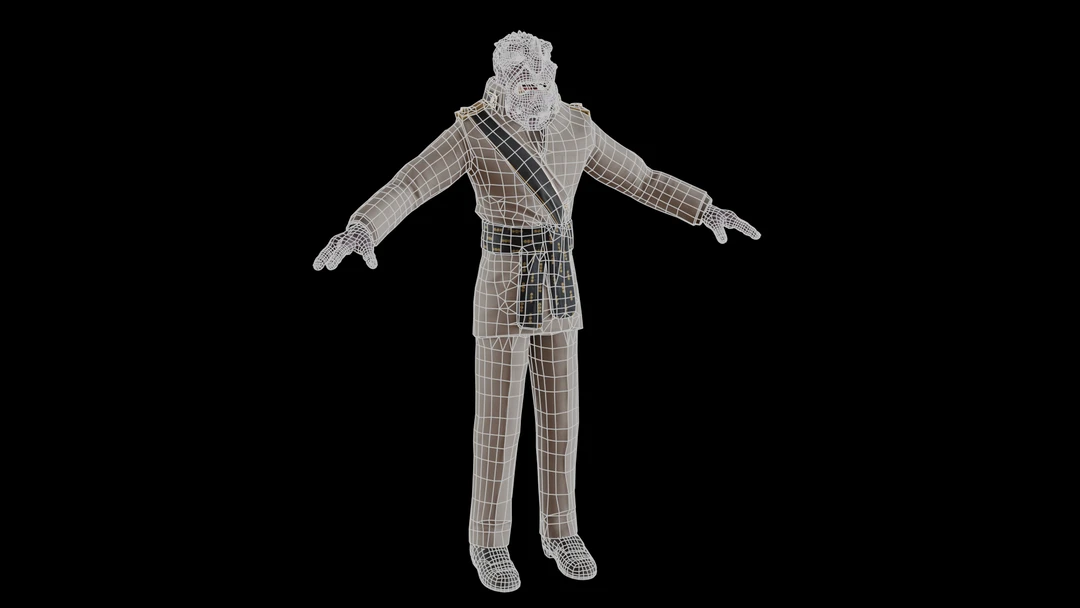
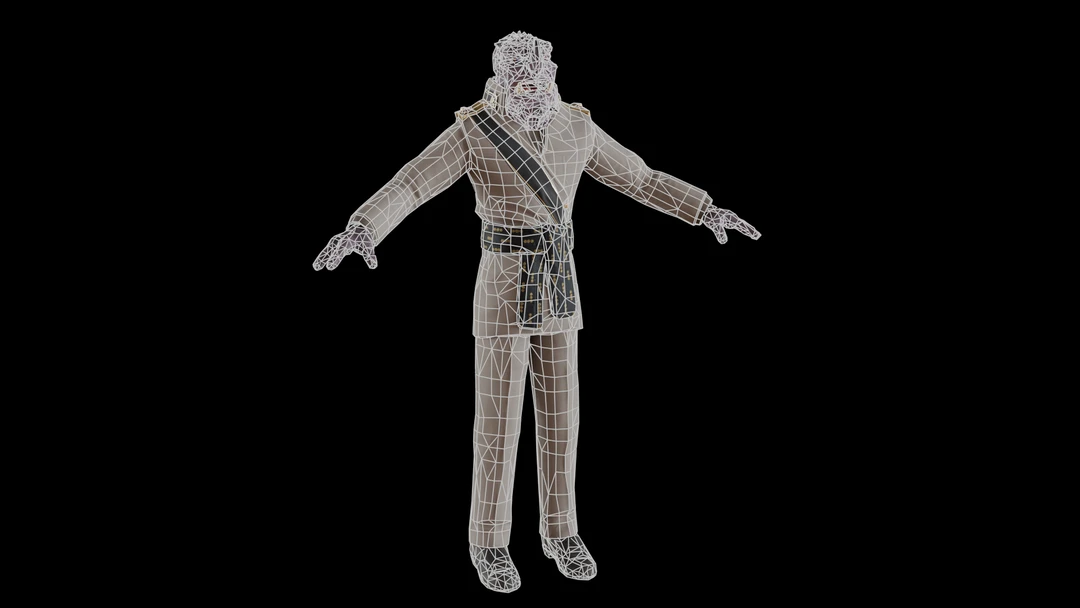
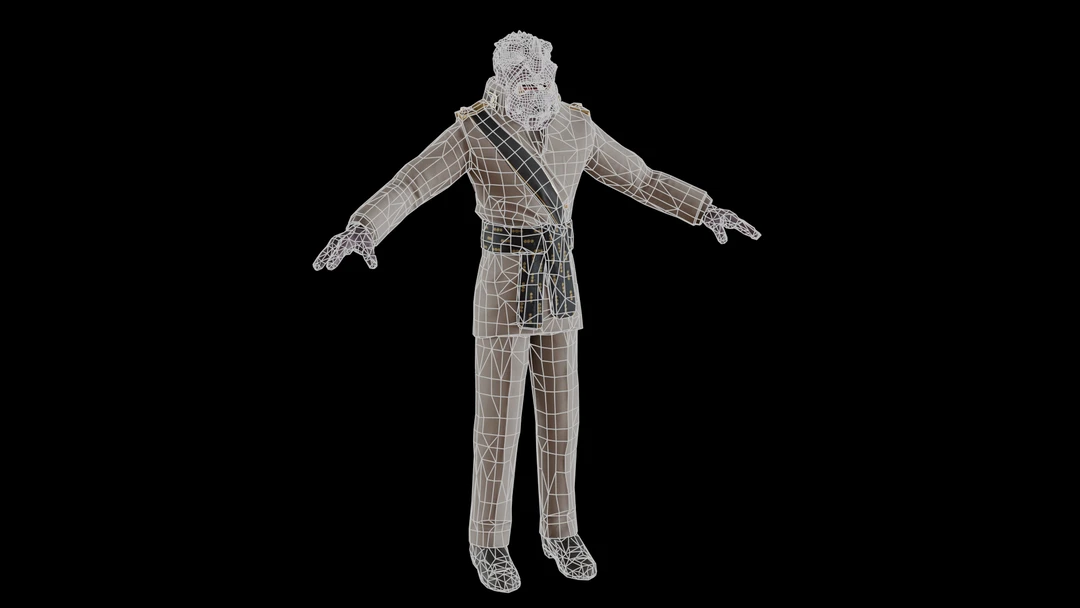
If we look closer at the face we can see that it has more geometry preserved when vertex weights are used.
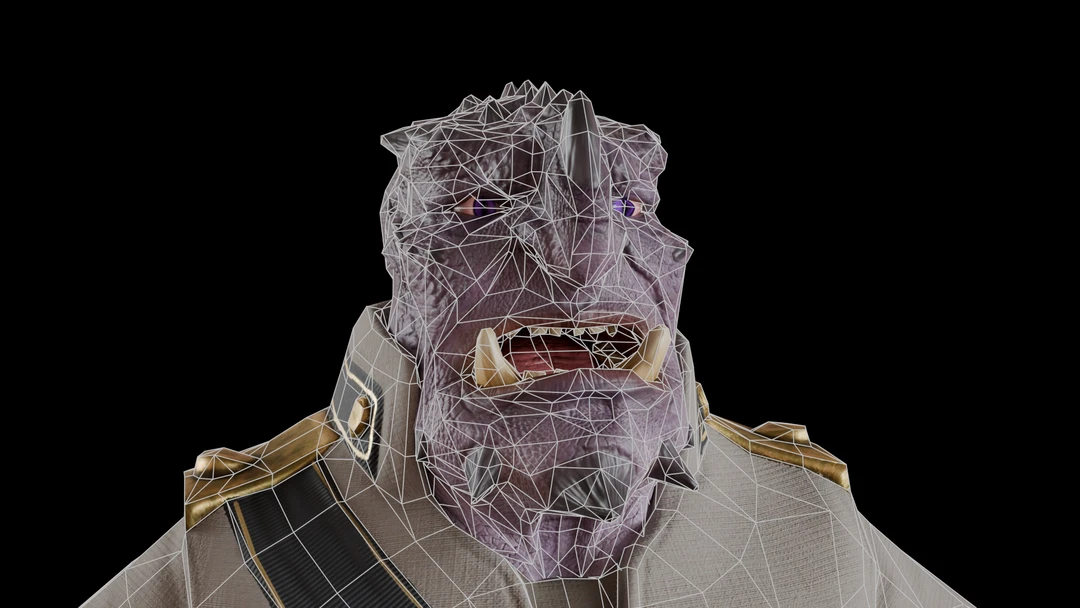
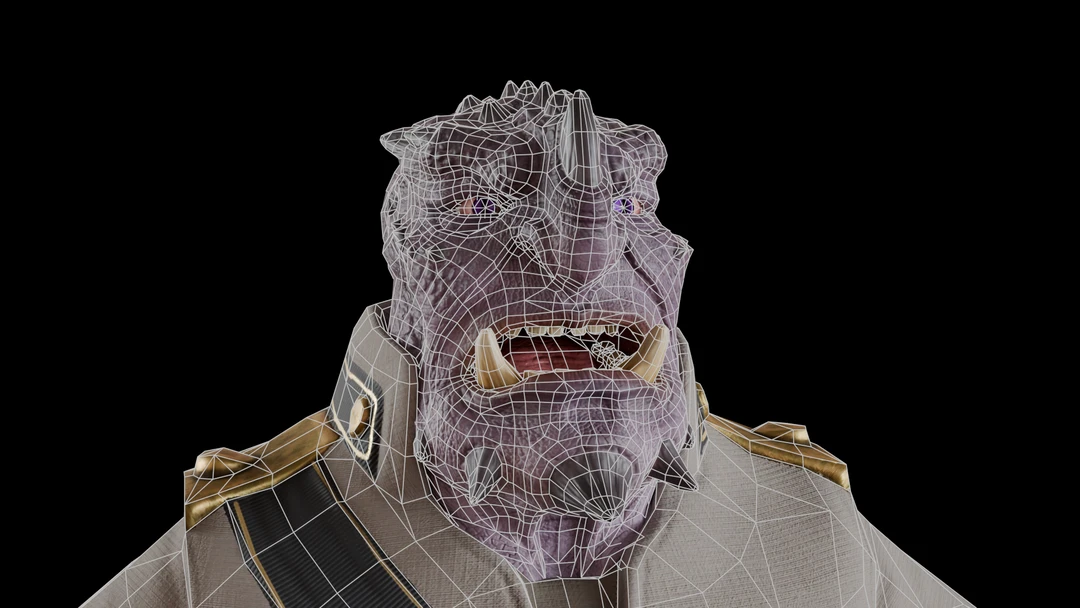
Lastly we can look at the triangle counts. Since lots of the geometry is allocated in the face, we get less reduction when we use vertex weights.
| Model | Triangle count |
|---|---|
| Original | 17 k |
| No vertex weighting used | 7 k |
| With vertex weighting on the face | 12 k |
Complete script
# Copyright (c) Microsoft Corporation.
# Licensed under the MIT license.

from simplygon10 import simplygon_loader
from simplygon10 import Simplygon

scene_mesh_type_name =  "SceneMesh"

def vertex_weights_from_bones(scene: Simplygon.spScene, bone_weight_influence: list[float]):
    scene_meshes_selection_set_id = scene.SelectNodes(scene_mesh_type_name)
    scene_meshes_selection_set = scene.GetSelectionSetTable().GetSelectionSet(scene_meshes_selection_set_id)

    for node_id in range(scene_meshes_selection_set.GetItemCount()):
        scene_mesh = Simplygon.spSceneMesh.SafeCast(scene.GetNodeByGUID( scene_meshes_selection_set.GetItem(node_id)))

        geometry = scene_mesh.GetGeometry()
        if not geometry:
            continue

        if not geometry.GetBoneIds() or not geometry.GetBoneWeights():
            print(f"Mesh {scene_mesh.GetName()} does not have bone weights, skipping.")
            continue

        # Add vertex weight field.
        if not geometry.GetVertexWeights():
            geometry.AddVertexWeights()
        weights_field = geometry.GetVertexWeights()
        vertex_weights = [1] * weights_field.GetItemCount()

        bone_ids = geometry.GetBoneIds().GetData()
        bone_weights = geometry.GetBoneWeights().GetData()
        bones_per_vertex = geometry.GetBoneIds().GetTupleSize()

        # Loop through all vertices and calculate the vertex weight based on the bone weights and the bone importance values.
        for vert_num in range(0, len(vertex_weights)):
            sum_weight = 0
            for bone_num in range(0, bones_per_vertex):
                current_bone_weight = bone_weights[vert_num * bones_per_vertex + bone_num]
                current_bone_id = bone_ids[vert_num * bones_per_vertex + bone_num]
                # Only bones with a weight greater than 0 are used.
                if (current_bone_weight > 0):
                    sum_weight += current_bone_weight * bone_weight_influence[current_bone_id]
            vertex_weights[vert_num] = sum_weight

        weights_field.SetData(vertex_weights, len(vertex_weights))
    scene_meshes_selection_set = None
    scene.GetSelectionSetTable().RemoveItem( scene_meshes_selection_set_id )

def get_bone_weights(scene: Simplygon.spScene) -> list[float]:
    bones = scene.GetBoneTable()
    return [1] * bones.GetBonesCount()

def set_bone_importance(sg: Simplygon.ISimplygon, scene: Simplygon.spScene, bone_weights: list[float], bone_name: str, importance: float, recursive: bool):
    bones = scene.GetBoneTable()
    bone_id = bones.FindBoneId(bone_name)
    bone_weights[bone_id] = importance
    print(f"Bone {bone_name} set to importance {importance}.")

    if (recursive):
        bone = bones.GetBone(bone_id)
        child_bones = sg.CreateRidArray()
        bone.CollectAllChildBones(child_bones)
        for child_bone_id in child_bones.GetData():
            bone_weights[child_bone_id] = importance
            print(f"- Bone {bones.GetBone(child_bone_id).GetName()} set to importance {importance}.")

def reduce_with_weights(sg: Simplygon.ISimplygon, asset_file: str, output_file: str):
    scene_importer = sg.CreateSceneImporter()
    scene_importer.SetImportFilePath(asset_file)
    if scene_importer.Run() == Simplygon.EErrorCodes_NoError:
        scene = scene_importer.GetScene()

        bone_weights = get_bone_weights(scene)

        # All bones under head will be given high importance value.
        set_bone_importance(sg, scene, bone_weights, "CongressRhienolph_ Head", 5, True)

        vertex_weights_from_bones(scene, bone_weights)

        reduction_pipeline = sg.CreateReductionPipeline()
        reduction_settings = reduction_pipeline.GetReductionSettings()
        reduction_settings.SetReductionTargets(Simplygon.EStopCondition_Any, False, False, False, True)
        reduction_settings.SetReductionTargetOnScreenSize(300)

        weight_settings = reduction_pipeline.GetVertexWeightSettings()
        weight_settings.SetUseVertexWeightsInReducer(True)

        reduction_pipeline.RunScene(scene, Simplygon.EPipelineRunMode_RunInThisProcess)

        scene_exporter = sg.CreateSceneExporter()
        scene_exporter.SetExportFilePath(output_file)
        scene_exporter.SetScene(scene)
        scene_exporter.Run()


def main():
    sg = simplygon_loader.init_simplygon()
    reduce_with_weights(sg, "SK_DignitaryRhienolph.fbx", "output.fbx")
    del sg

if __name__== "__main__":
    main()